See how Firestore, Hosting, redirects and Android App Links fit together.
NFC Tag Manager
Manage NFC tag destinations without rewriting installed tags
NFCMagic turns a physical NFC tag into a manageable smart touchpoint. Write one stable link to a compatible tag, update its final destination later, pair it with a QR fallback, and keep the installed tag useful without replacing it.
Dynamic NFC and QR
Use one stable NFC or QR link, then update the destination later.
Dynamic Smart Tags are best for restaurants, retail packaging, museums, guest spaces, business cards and industrial maintenance where the physical label should stay in place.
Design one destination that works for both tap and camera users.
Decide when to use a chip, a printed code, or both together.
Use a permanent menu link with both a table QR code and an NFC tag.
Google Trends NFC topics
Ten search-intent guides for NFC tag users
These ten guides cover iPhone NFC, tag meaning, apps, hardware types, pricing, social profiles, practical ideas, Foqos focus workflows and notification safety without splitting close keyword variants into competing pages.
Learn how NFC works on iPhone, which models read tags in the background, where to tap, how Shortcuts automations work and why some scans fail.
What is NFC? Understand its meaning, 13.56 MHz close-range operation, passive tags, NDEF records, phone modes, common uses and security limits.
Choose an NFC tag app or tool for Android, iPhone or desktop, then read, write and verify NDEF safely while understanding ACR122U and raw access.
Compare NFC Forum tag types and NTAG213, NTAG215 and NTAG216 by protocol, user memory, security, phone compatibility and practical deployment needs.
Compare NFC stickers, cards, keychains and anti-metal tags by antenna, adhesive, durability, printing, placement and phone performance before buying.
Understand NFC tag price drivers, compare retail and bulk buying, evaluate Amazon, Alibaba and AliExpress listings, and calculate real deployed cost.
Create an Instagram NFC tag or digital business card with a stable HTTPS profile, editable destination, QR fallback, accessible design and safer analytics.
Explore practical NFC tag ideas for home, work, accessibility and maintenance, with safe Android automation patterns, permissions, testing and recovery.
Use Foqos with an NFC tag on iPhone to start and stop focus sessions, choose timer or pause strategies, place the tag well and protect your routine.
Understand Cash App NFC tag notifications, ordinary website tag alerts and AirTag safety messages, then identify the source and respond without unsafe taps.
Complete NFC library
All NFC and Android tag articles
Every existing NFC-focused article is linked from this NFC Tag hub so readers and search engines can move from a broad topic to the most relevant implementation guide.
Learn how Android NFC works from the 13.56 MHz radio field to TagTechnology, NDEF parsing, antenna placement and production-ready reader workflows.
Understand NDEF message headers, TNF values, text and URI payloads, multi-record ordering, capacity overhead and safe NFC product design.
Compare Android NFC reader mode with foreground dispatch across lifecycle, callbacks, intent filters, reader flags, performance and device testing.
Design a safe Android NFC write flow with payload validation, capacity checks, verify-after-write, TagLost recovery, locking safeguards and clear states.
Learn why Android NFC apps cannot clone protected access cards, how UID differs from a credential, and where public NDEF copying legitimately applies.
A technical guide to NTAG 424 DNA Secure Dynamic Messaging, AES-CMAC verification, counters, key management, provisioning and anti-counterfeit design.
Design a combined QR and NFC experience with one durable destination, accessible fallbacks, print and antenna rules, analytics and tamper-aware security.
Build safe tap-triggered NFC automation on Android with task profiles, conditions, permissions, webhooks, Home Assistant, MQTT, retries and audit states.
Make Android NFC scanning, writing and automation accessible with TalkBack labels, tactile placement, redundant feedback, clear errors and physical-device testing.
Compare NTAG213, NTAG215 and NTAG216 user memory, NDEF capacity, antenna and material choices, security features, sourcing and real-world use cases.
Plan reliable NFC batch writing with versioned profiles, serialization, operator stations, verify-after-write, reject handling, audit logs and supplier quality control.
Use NFC memory dumps responsibly: understand pages, blocks and files, compare hexadecimal data, preserve evidence, avoid unsafe restores and protect sensitive data.
Understand Android Host Card Emulation limits: ISO-DEP, APDUs, AID routing, random UID behavior, screen state, reader timing and secure credential boundaries.
Design end-to-end NFC product authentication with threat modelling, secure tags, protected provisioning, backend verification, replay controls and trustworthy results.
Build dynamic NFC tags with stable HTTPS URLs, Firestore data, secure rules, Firebase Hosting, Android App Links, safe redirects and privacy-aware analytics.
Design private NFC scan history with local-first storage, data classification, retention controls, safe export, Android permissions and user-directed deletion.
Create professional NFC business cards with the right chip, antenna and material, vCard or dynamic profile, QR fallback, accessible landing page and production testing.
Diagnose Android NFC read and write failures with a structured decision tree covering hardware, antenna position, tag technology, capacity, locks and TagLost errors.
Create accurate NFC app documentation with task-based guides, tested device context, safe code samples, accessible screenshots, versioning and structured data.
Understand the NFCMagic product roadmap for makers and teams: capability areas, validation gates, compatibility work, integrations, migration policy and success metrics.
Learn how to read an NFC tag on Android, find the phone antenna, interpret UID and NDEF data, recognise protected tags and troubleshoot unreliable scans safely.
Learn how to write NFC tags on Android using valid NDEF records, exact capacity checks, verify-after-write, safe retries and warnings for permanent locks.
Compare NFC vs QR code for cost, speed, compatibility, durability, security, analytics and accessibility, then choose one channel or a coordinated dual-label experience.
Set up an NFC tag for Wi-Fi sharing on Android with receiver compatibility checks, guest-network security and modern Wi-Fi Easy Connect alternatives.
How it works
The smart link is the part the user manages
The chip or QR stays in the real world. The destination changes in the cloud-controlled profile.
1. Create a smart tag profile
Name the tag, choose the type of campaign or asset, and assign an internal ID that is safe to print or write to NFC.
2. Write or print the stable link
The NFC tag or QR code stores a stable App Link or hosted URL. That physical marker does not need to change when the campaign changes.
3. Update the destination later
The owner changes the destination URL from the manager: landing page, menu, support page, product manual, booking page, video or app deep link.
4. Measure and protect the experience
The manager can support tap totals, active or paused state, fallback URLs and ownership checks so the public tag does not become confusing.
Inside the Android app
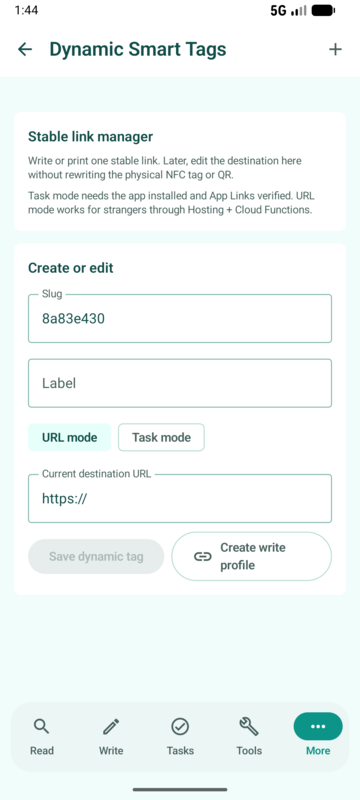
Create, update, publish and reuse smart tags from NFCMagic
The app-side manager is where a user turns a cloud smart tag into something usable in the real world: an NFC payload, a QR code, or a task-enabled App Link.
URL mode
Use URL mode when the public tap should redirect to a website. Examples include menus, product manuals, booking pages, support pages, warranty forms, campaign pages and portfolio links.
Example: a restaurant changes table tags from breakfast to dinner without touching the stickers on the tables.
Task mode
Use task mode when an installed Android user should open NFCMagic and run a saved Tasks workflow. This is useful for operators, technicians, smart-home users and internal teams.
Example: a maintenance tag opens the latest machine checklist and starts the inspection timer for authorised staff.
QR generator
The same stable smart link can be shown as a QR code. This gives every deployment a camera fallback and a printable channel for posters, packaging, menus and manuals.
Example: a product box has NFC for tap users and QR for camera users, both pointing to the same owner-managed destination.
Write profile
NFCMagic can prepare the stable smart link as a writeable NDEF profile so the user can write it to compatible NFC tags through the existing write flow.
Example: an installer creates one smart tag profile, then writes the same stable link to a batch of replacement shelf labels.
What the user can manage
Destination URL: change a restaurant menu from breakfast to dinner, redirect a product tag from launch content to support content, or update a business card profile after a role change.
Status: pause a campaign when a label is damaged, a product is recalled, or an event is over.
Fallback: send unsupported devices to a web page while Android App Links can open the app for users who have it installed.
Campaign context: keep names, product groups, UTM parameters and notes so teams can understand why a tag exists.
Analytics: review tap counts and daily trends to learn whether a tag is actually helping customers.
Why this is different from a fixed tag
A fixed NFC tag stores the final URL directly. If the URL changes, the owner must rewrite the tag or replace the label. A dynamic smart tag stores a stable resolver URL. The resolver looks up the latest destination and redirects the user. This is why smart tags are practical for printed packaging, installed signs and long-lived assets.
NFCMagic does not use Firebase Dynamic Links. The intended architecture is Android App Links plus hosting and backend redirect logic, which keeps the product ready for modern Android and web routing.
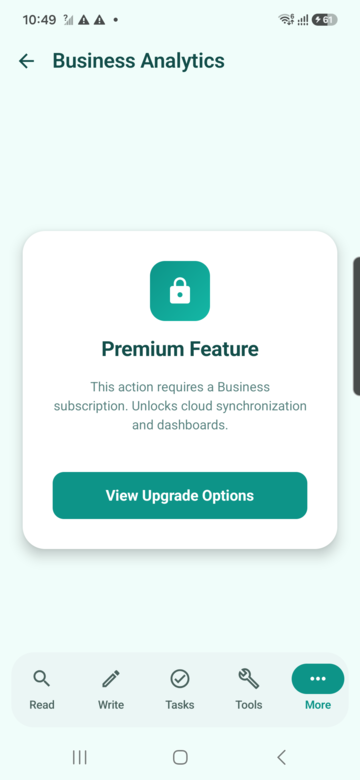
Business result
The backend manager is for the owner of the tag: update links, pause tags, review engagement and keep printed labels useful after the first deployment.
Use cases
Where dynamic smart tags help
These examples explain the practical value for normal users, professionals and businesses.
Restaurant and hospitality
A table tag opens today's menu. Later the owner changes the same tag to breakfast, lunch, dinner, events or allergy information without replacing the table sticker.
Retail and packaging
A product label opens a launch video during marketing, then later changes to warranty registration, support instructions or reorder links.
Industrial maintenance
A machine tag opens the correct maintenance checklist. If the checklist system changes, the destination is updated centrally while the tag remains on the machine.
Smart home
A home tag can point guests to Wi-Fi instructions today, a house manual tomorrow, and a temporary event page during a party or rental stay.
Museums and education
An exhibit tag can rotate between audio guide, children-friendly explanation, accessibility content and seasonal material.
Business cards
A printed NFC card keeps working after a phone number, calendar link, portfolio URL or job title changes.