Direct answer
Choose an NFC tag app or tool for Android, iPhone or desktop, then read, write and verify NDEF safely while understanding ACR122U and raw access.
What an NFC tag app should do
A useful NFC tag app makes discovery understandable before it offers modification. It should show technology, NDEF records, capacity, writable state and errors; compose standards-based records; calculate the encoded message; write off the main thread; and re-read the result. Advanced functions belong behind clear warnings and authorization boundaries.
- Readable results
- Users need decoded URLs, text and record types alongside technical identifiers rather than an unexplained hexadecimal dump.
- Recoverable states
- Tag lost, insufficient capacity, write protection, malformed NDEF and unsupported technology require different messages and next steps.
Reader, writer and automation intents
App selection starts with the intended outcome. A reader identifies and decodes an existing tag. A writer changes public NDEF content. An automation tool maps a deliberate tap to actions on that device. Diagnostic or provisioning software may use raw commands, but that additional power increases compatibility and safety responsibility.
- Do not conflate tasks
- An app that opens a URL well may not expose memory details, and a low-level tool may be awkward for a simple business card.
- Platform scope
- NFCMagic targets Android; iPhone applications use Apple's Core NFC and Shortcuts models instead of Android APIs.
Reading before programming
Always inspect the target first. The scan establishes whether the tag exposes NDEF, how large the container is, whether writes are permitted and what content would be replaced. A batch labeled NTAG216 can still contain a different IC, a locked configuration or a damaged inlay, so seller artwork is not evidence.
- Preserve data
- Save or export legitimate existing content before overwriting a tag that may belong to an established workflow.
- Permission boundary
- Detection does not authorize bypassing protected memory, copying credentials or guessing passwords.
Programming NDEF records
For broad phone compatibility, program a valid NDEF message with a suitable record type. A short HTTPS URI is usually preferable to a long marketing URL because it consumes less memory and can route through a managed destination. Text, contact and MIME records are useful when the receiving workflow explicitly supports them.
- Measure encoded bytes
- The final message includes record headers and type data, so character count alone cannot predict whether it fits.
- Use HTTPS
- A secure, stable web destination works across platforms and can provide app links plus a browser fallback.
A safe write transaction
Validate input, connect to the current tag, confirm it is writable, compare the complete message with reported capacity and perform the blocking write away from the interface thread. Keep the phone still, close the connection in every path and re-read the stored message before declaring success to the operator.
- TagLost recovery
- A moved tag needs a fresh discovery event and a controlled retry, not reuse of the expired handle.
- Permanent lock
- Read-only conversion should require separate confirmation after the payload has been independently verified.
Android NFC tools
Android exposes NDEF and technology classes such as NfcA, IsoDep and NfcV. A professional tool can show the technology list, store scan history, build reusable profiles, write batches and explain low-level diagnostics. Raw access should be tied to a known protocol and never presented as a universal unlock mechanism.
- Background work
- Android documents NFC I/O as blocking; applications should move it off the main thread and handle I/O exceptions.
- Hardware variance
- Antenna position and controller firmware differ between phones, making real-device testing essential for release claims.
iPhone NFC tools
On iPhone, Core NFC applications can read NDEF and supported protocol families, while compatible software can save data to writable tags. Background URI handling and Shortcuts triggers are separate system features. Choose an app that clearly states its device requirements instead of promising identical behavior across every iPhone generation.
- Background limitation
- A tag that opens a website notification may not expose all records that an active reader app can inspect.
- Automation limitation
- A Shortcuts identifier trigger can coexist with NDEF content, but it does not mean the automation interprets every stored record.
Where the ACR122U fits
The ACR122U is a USB contactless smart-card reader commonly used with desktop software; it is not an Android or iPhone app. A desktop setup can be useful for controlled stations, but driver support, protocol scope and operating-system integration must be confirmed. Phone-oriented articles should not treat its behavior as universal NFC.
- Reader versus tag
- The ACR122U supplies the reader field and commands; a sticker or card remains the target data carrier.
- Production discipline
- A repeatable station needs versioned payloads, operator feedback, verification and reject handling rather than a one-off write script.
How to evaluate an NFC app
Look for transparent permissions, offline behavior, clear safety boundaries, export options and current support information. Confirm that the app distinguishes public NDEF copying from protected credentials. For business use, require reusable profiles, audit-friendly results and a privacy model that matches the data handled by tags and destinations.
- Evidence over ratings
- Test the exact chip, phone and workflow with a small sample instead of choosing solely from store screenshots.
- No secret logging
- Diagnostic output should avoid payment data, protected identifiers, passwords, full dumps and provisioning keys.
Quick reference
| Tool | Best for | Main check |
|---|---|---|
| Phone reader app | Field inspection | Decoded records and state |
| Phone writer app | NDEF programming | Capacity and verification |
| Automation app | Personal routines | Permissions and conditions |
| USB reader | Desktop station | Drivers and protocol support |
Related NFCMagic app screens
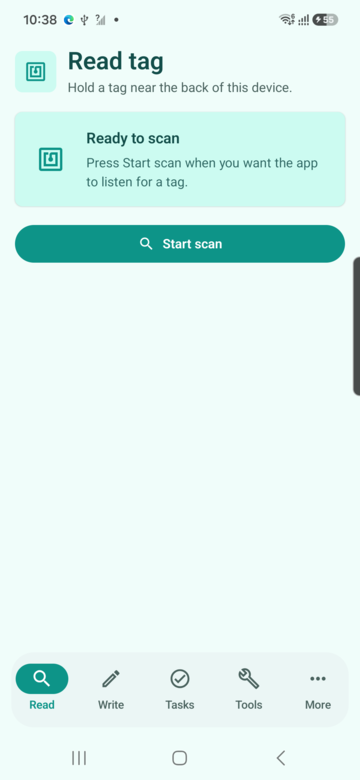
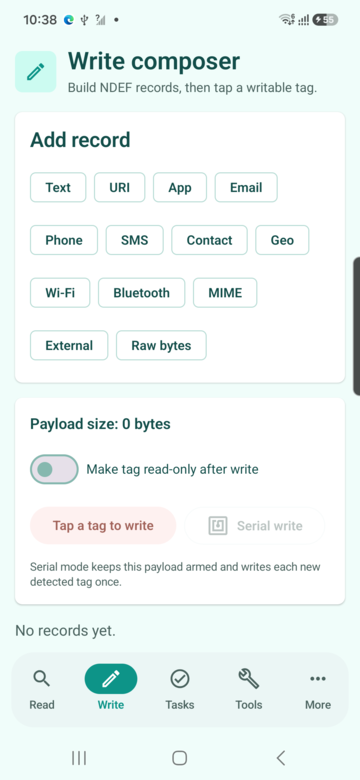
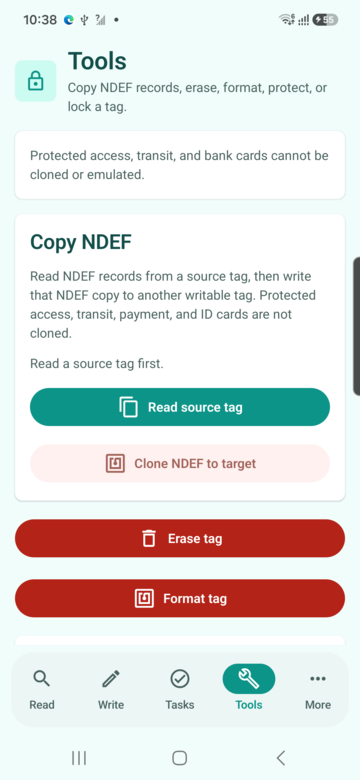
These screenshots connect this nfc tag app guide to the related Android workflow in NFCMagic. They document interface states; radio behavior still requires a physical Android device and real tags.
Frequently asked questions
What is the best NFC tag app?
The best choice matches the task and platform, shows capacity and lock state, verifies writes and explains permissions and errors clearly.
Can an NFC app program any card?
No. Public writable NDEF tags differ from protected payment, transit, identity and access credentials.
What is ACR122U?
It is USB contactless reader hardware used with desktop software, not a mobile NFC application.
Should a writer verify the tag?
Yes. Re-reading the final message is the practical way to detect an incomplete, wrong-target or corrupted write.
Primary technical sources
- Android Developers: Advanced NFC — Official guidance for tag technologies, NDEF writing and foreground dispatch.
- Android Developers: Ndef API — Official API contract for capacity, writability, NDEF I/O and tag-loss errors.
- Apple Developer: Core NFC — Official iPhone framework documentation for reading NDEF and protocol-specific tags and writing compatible tags.
- NFC Forum specifications — Primary specification index for NDEF, record types and interoperable NFC tag behavior.