Direct answer
Design private NFC scan history with local-first storage, data classification, retention controls, safe export, Android permissions and user-directed deletion.
Inventory scan data before storing it
A history feature may encounter timestamp, technology list, UID, NDEF text, URLs, contact data and diagnostic bytes. List each field, its user purpose, storage location and deletion rule before making every scan persist automatically.
- Purpose test
- If a field does not help the user reopen, search, troubleshoot or export a scan, leave it out of the default history record.
- Sensitivity
- Treat contact records, private URLs, network configuration and access-adjacent identifiers more carefully than a public product page.
Prefer local-first history
Most scan recall can stay in app-private storage on the device. Local-first design reduces server exposure, works offline and avoids turning every physical tap into a cloud event the user did not request.
- Private storage
- Use application-internal databases or files with normal Android sandbox protections rather than shared public directories.
- Cloud boundary
- Make sync a separate opt-in feature with a visible account, scope and deletion behavior instead of an invisible extension of local history.
Classify public content and sensitive records
A restaurant URL and a personal vCard are both NDEF, but they create different privacy risk. Classification lets the app mask previews, exclude fields from search indexes or ask before saving high-risk payloads.
- Content-aware preview
- Show enough information to identify the scan while hiding passwords, tokens and long personal fields until the user opens the entry.
- Unknown data
- Treat unrecognized MIME, external records and raw bytes as potentially sensitive instead of copying them into analytics or crash reports.
Set retention and automatic cleanup
History should not grow forever merely because storage is available. Offer a retention window, maximum entries or manual-only mode and explain whether pinned records are exempt from automatic cleanup.
- Predictable deletion
- Show the next cleanup policy in settings and make changes apply prospectively without surprising loss of pinned items.
- Operational need
- Short local retention often supports troubleshooting while reducing the impact of a lost or shared device.
Give users complete deletion control
Support per-entry delete, filtered bulk delete and clear-all with an honest confirmation. Clearing visible rows must also remove associated dump files, search indexes and queued exports that belong to those records.
- Verification
- After deletion, refresh from the source of truth and report any item that could not be removed.
- App removal
- Document how clearing app storage or uninstalling affects local history and which explicitly enabled cloud records remain.
Protect encryption keys and backups
Application-private storage benefits from Android sandboxing and device encryption, while additional field encryption may be appropriate for sensitive saved profiles. Keys belong in Android Keystore and must not be exported beside the encrypted database.
- Backup policy
- Decide whether scan data participates in Android backup and test restore behavior on a different device.
- Key loss
- If protected keys cannot migrate, explain that restored encrypted fields are unavailable rather than falling back to plaintext storage.
Export without accidental disclosure
JSON or text export is useful for support and user ownership, but the preview should show which identifiers, payloads and timestamps will leave app-private storage. Provide redaction choices before invoking the Android share sheet.
- Scoped sharing
- Use a content URI with temporary read permission and avoid permanent world-readable files.
- Safe defaults
- Exclude full memory dumps and secret-like values unless the user explicitly selects them for an authorized diagnostic purpose.
Minimize permissions and external services
Reading NFC needs the NFC permission but does not require identity or location. Ask for camera only when the user opens QR scanning, and request location or notifications only when a feature with a clear explanation genuinely needs them.
- SDK review
- Audit third-party libraries because an analytics or crash SDK can collect device data even when NFC history itself stays local.
- Graceful denial
- Core read and write features should continue without unrelated optional permissions.
Review privacy as the product evolves
Dynamic tags, AI assistance, connectors and product verification add new data flows that local history did not have. Update the data map, user disclosure and deletion path when the feature changes, not only when the privacy policy text is rewritten.
- Release gate
- For each new field, record purpose, recipient, retention, security control and user setting before enabling collection.
- No fake anonymity
- A random identifier can still become linkable across events; minimize its use and avoid joining it to unrelated datasets.
Quick reference
| Data | Default handling | User control |
|---|---|---|
| Decoded public NDEF | Local history preview | Delete or disable history |
| Sensitive record | Masked or excluded | Explicit reveal and export |
| Raw dump | Not saved automatically | Authorized opt-in file |
| Cloud analytics | Off for local scans | Separate feature consent |
Related NFCMagic app screens
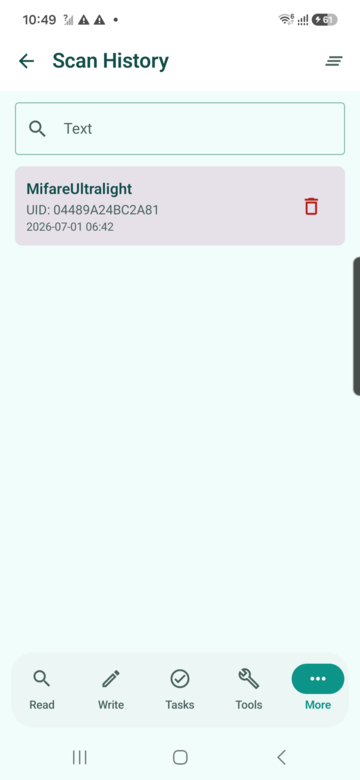
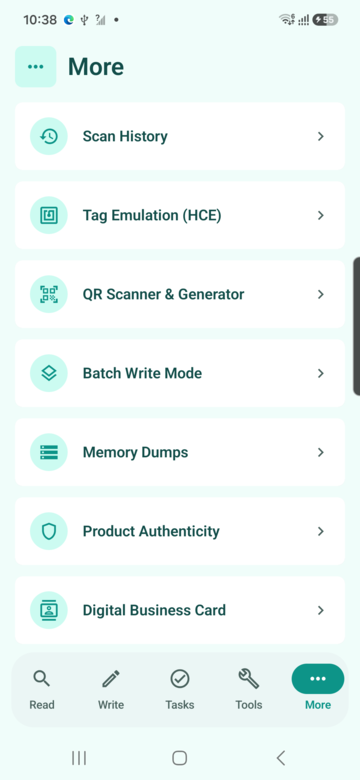
These screenshots connect this privacy for NFC scan history guide to the related Android workflow in NFCMagic. They document interface states; radio behavior still requires a physical Android device and real tags.
Frequently asked questions
Does NFC scan history need to be uploaded?
No. Search and recall can be implemented in app-private local storage; cloud sync should be an explicit optional feature.
Should every NFC UID be stored?
Only when the user-facing history or diagnostic purpose requires it, with clear retention and deletion controls.
How should exported history be shared?
Preview and redact it, then use a temporary content URI instead of leaving a public file on shared storage.
Does a random identifier guarantee anonymity?
No. Repeated identifiers can still link events, so collect and retain only what the feature genuinely needs.
Primary technical sources
- Android Developers: Privacy checklist — Platform guidance for data minimisation, permissions and user control.
- Android Developers: Android Keystore — Official key-storage model and hardware-backed protection guidance.