Direct answer
Make Android NFC scanning, writing and automation accessible with TalkBack labels, tactile placement, redundant feedback, clear errors and physical-device testing.
Accessibility spans the app and the physical tag
An NFC workflow begins before the screen reacts: the user must find the marker, locate the phone antenna and keep both objects aligned. Product teams therefore need accessible packaging and installation as well as accessible Android components.
- Physical cue
- Use tactile marks, high-contrast symbols or consistent placement so a user does not have to see a hidden inlay.
- Digital cue
- Announce the scan purpose and current state before requiring precise movement of the device.
Design for vision, hearing, motor and cognitive needs
Different users may rely on screen readers, switch access, magnification, captions, haptics or simplified instructions. Avoid optimizing only for one disability profile or assuming every person can hold a phone steadily with one hand.
- Multiple modes
- Pair text with icon, sound with haptic and color with shape so one sensory channel is never the sole carrier of meaning.
- Low effort
- Keep the target active long enough for deliberate positioning and provide a retry button that does not erase entered content.
Create meaningful TalkBack labels
Interactive elements need names that describe the action and state: Start NFC scan, Stop scanning, Write selected profile and Try this tag again are more useful than Scan icon or Button. Decorative images should not clutter the accessibility tree.
- Dynamic state
- Update semantics when a control changes from idle to armed, and announce completion without forcing focus to an unrelated element.
- Grouped information
- Combine tightly related metadata into a sensible reading order instead of making each label and punctuation mark a separate focus stop.
Never communicate status through color alone
Green, amber and red are useful reinforcement but cannot independently communicate genuine, pending or failed. Every result needs readable text, a meaningful icon and sufficient contrast in both light and dark themes.
- Authenticity
- Say Authentic, Verification pending or Could not verify and include the reason category where it is safe to do so.
- Write result
- Differentiate written, written and verified, read-only and failed rather than showing the same colored toast.
Coordinate haptic, audio and visual feedback
A short haptic pulse can confirm detection while a different pattern marks completion, but vibration must not race with system sounds or imply success before verification finishes. Respect user settings and reduced-interruption contexts.
- Event mapping
- Document one cue per lifecycle event so repeated discoveries cannot create confusing overlapping signals.
- Alternative
- Every audio or haptic cue must have an equivalent visible and screen-reader announcement.
Make physical positioning understandable
Phones place NFC antennas near different edges or camera modules. Instructions should encourage slow movement across the marked area, show an approximate device-specific location when known and avoid blaming the user for a short RF field.
- Reach
- Install public markers at reachable heights and avoid positions that require twisting the phone against a wall or machine.
- Time
- Do not use a short unexplained timeout; let the user stop deliberately and preserve the task state.
Build accessible error recovery
An error message should identify what happened, whether anything changed and what the user can do next. Keep keyboard or switch focus near the recovery action and retain the payload after a movement or capacity failure.
- Plain language
- Say The tag moved before writing finished; scan it to check the current content instead of exposing only TagLostException.
- Permanent state
- For a locked tag, explain that another retry will not make it writable and offer a path to use a different target.
Support large text and reflow
NFC metadata, hexadecimal values and long URLs must remain usable with enlarged fonts. Allow rows to wrap, keep labels adjacent to values and avoid fixed-height cards that clip error or translation text.
- Orientation
- Important workflows should survive portrait rotation and narrow windows without hiding the primary stop or retry controls.
- Selectable data
- Let technical users copy a value without forcing every decorative character into the screen-reader reading order.
Test with services and real NFC hardware
Automated checks can find missing semantics and contrast problems, but they cannot prove that a blind user can locate a tag or that a switch user can recover before the RF field disappears. Combine tools with TalkBack, Switch Access and physical task testing.
- Scenario test
- Run complete read, write, error and retry journeys without looking at the screen, then repeat without audio and with large text.
- Participant evidence
- Record where users hesitate, move the phone incorrectly or miss a state change and fix the interaction rather than adding more help text afterward.
Publish accessible screenshots and documentation
Website screenshots need specific alt text that explains the relevant app state, while surrounding captions should teach the workflow instead of repeating the filename. Documentation must provide the same instruction shown visually.
- Alt purpose
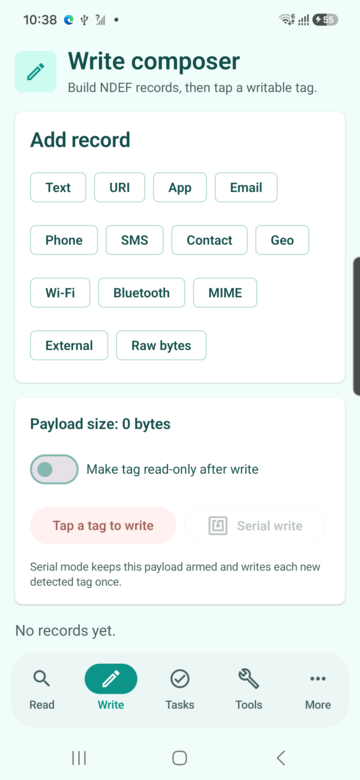
- Describe why the image is present, such as a write composer showing payload size before the target is requested.
- No screenshot-only steps
- Keep buttons, warnings and sequences in HTML text so zoom, translation and assistive technology can use them.
Quick reference
| Need | Primary support | Required equivalent |
|---|---|---|
| Low vision | TalkBack and scalable text | Logical reading order |
| Color vision | Text and shape | No color-only status |
| Motor access | Large targets and Switch Access | Persistent retry path |
| Hearing | Visible status | No audio-only confirmation |
Related NFCMagic app screens
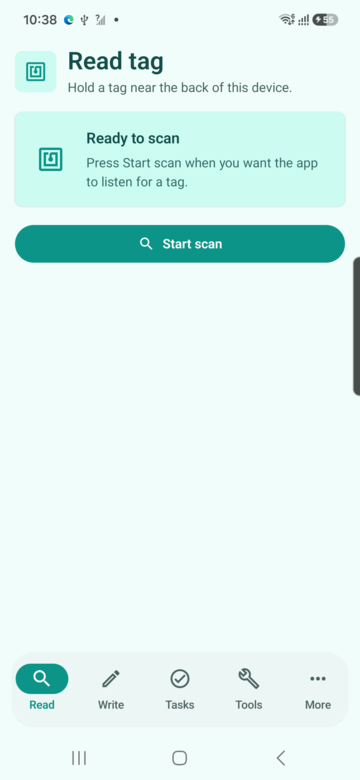
These screenshots connect this accessibility for NFC apps guide to the related Android workflow in NFCMagic. They document interface states; radio behavior still requires a physical Android device and real tags.
Frequently asked questions
Is adding alt text enough to make an NFC app accessible?
No. The physical tag location, Android semantics, feedback, timing and recovery path all contribute to accessibility.
Should NFC success use vibration?
Haptics are useful reinforcement, but the same result must also be available through text and accessibility announcements.
How should TalkBack announce a scan result?
Announce a concise state change first, then let the user explore structured tag details in a predictable order.
Can accessibility be tested in an emulator?
UI semantics can be inspected, but the complete positioning and RF interaction needs a physical phone and tags.
Primary technical sources
- Android Developers: Accessibility principles — Current Android guidance for labels, non-color cues and accessible interaction.
- W3C: Web Content Accessibility Guidelines 2.2 — Normative accessibility requirements for web content and text alternatives.
- Android Developers: NFC overview — Platform overview for Android reader, writer and tag-discovery behavior.