Direct answer
Learn how to read an NFC tag on Android, find the phone antenna, interpret UID and NDEF data, recognise protected tags and troubleshoot unreliable scans safely.
Prepare the Android phone before scanning
Start by confirming that the exact phone model contains NFC hardware and that NFC is enabled in system settings. NFCMagic can explain an unavailable or disabled adapter, but an application cannot add the missing controller and antenna to a device that was manufactured without them.
- Capability check
- Android exposes NFC availability through PackageManager and NfcAdapter, allowing a reader screen to distinguish missing hardware from a disabled radio.
- Visible workflow
- Keep the scanning screen open and the display awake so the user can see waiting, detected, reading and completed states during a physical tap.
Find the real NFC antenna location
The usable coupling area is usually on the upper or central rear surface of an Android phone, but its exact position varies by model, case and camera layout. Move the tag slowly across the back until the device responds, then hold both antenna planes steady for the remainder of the read.
- Orientation matters
- Flat, approximately parallel antenna planes normally couple better than touching only an edge or corner of a small inlay.
- Cases and accessories
- Metal plates, magnetic wallets, ring holders and thick battery accessories can detune or shield the field and should be removed during diagnosis.
Follow a repeatable first-scan procedure
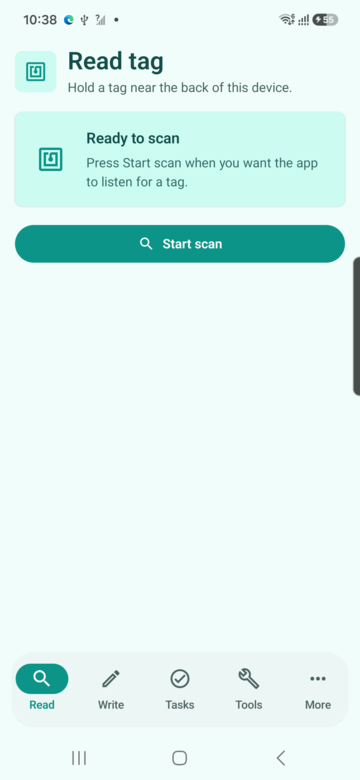
Open NFCMagic, enter the Read workflow, arm scanning and bring one known tag into the field. Wait for a complete result before moving away; rapid repeated taps can produce tag-loss errors that look like unsupported hardware even when discovery itself succeeded.
- Known reference
- A factory-fresh NTAG21x label is a useful baseline because it separates phone positioning problems from protected-card or proprietary-protocol behavior.
- One target
- Keep other cards and stickers away from the phone so anti-collision does not select an unintended tag from a wallet or stacked batch.
Understand the Android Tag object
Android creates a Tag handle for a single discovery event and lists the technologies detected for that target. NfcA, IsoDep, Ndef and other entries describe protocol layers available during that interaction; they are not product names and should not be treated as proof of a card's purpose.
- Fresh discovery
- Removing and presenting the target again creates a new handle, so applications should never retain a stale connection for a later tap.
- Technology selection
- Use Ndef for standard message content and open a raw technology only when the workflow has a documented protocol and authorization boundary.
Interpret UID without treating it as authentication
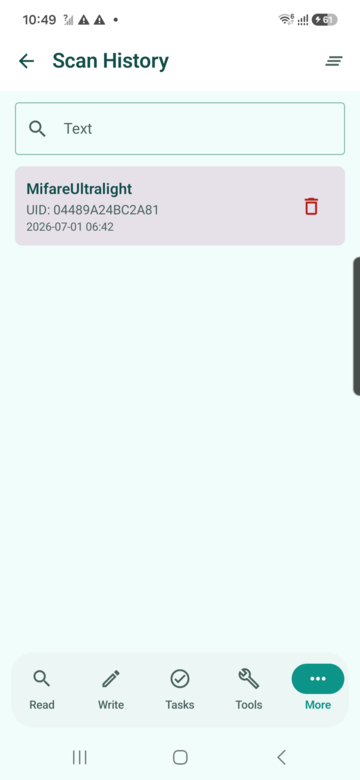
A reader may display the identifier returned during anti-collision, often called UID or serial number. Its length and mutability depend on the technology, and it is unsuitable as the sole security decision because some identifiers can be copied, randomised or relayed by other hardware.
- Diagnostic value
- UID can help distinguish tags during inventory or troubleshooting when the user understands that it is an identifier rather than a secret.
- Security boundary
- Access control, payment and product authenticity require protocol authentication or cryptographic evidence instead of equality against a visible UID.
Decode NDEF messages and records
NDEF is the interoperable message layer used for public text, URI, MIME and external-type records. A message can contain several records, so a complete reader reports the TNF, type, identifier and decoded payload for each record rather than displaying only the first URL.
- URI compression
- NDEF URI records can store a prefix code for common schemes, meaning the human-readable URL is reconstructed from more than the visible payload bytes.
- Unknown records
- Preserve safe hexadecimal or metadata diagnostics when a record cannot be decoded, but do not execute an unfamiliar payload automatically.
Read capacity, used bytes and write state
The Ndef technology reports the maximum NDEF message size and whether the current container is writable. Used bytes include record headers and other encoding overhead, so the visible text length alone does not predict whether a replacement message will fit on the same chip.
- Typical capacities
- NTAG213, NTAG215 and NTAG216 provide progressively larger user areas, commonly chosen for short links, richer profiles and multi-record payloads.
- Lock interpretation
- A read-only result may reflect permanent lock bits or configuration; reading data does not imply that an application can reverse that physical state.
Recognise protected and non-NDEF cards
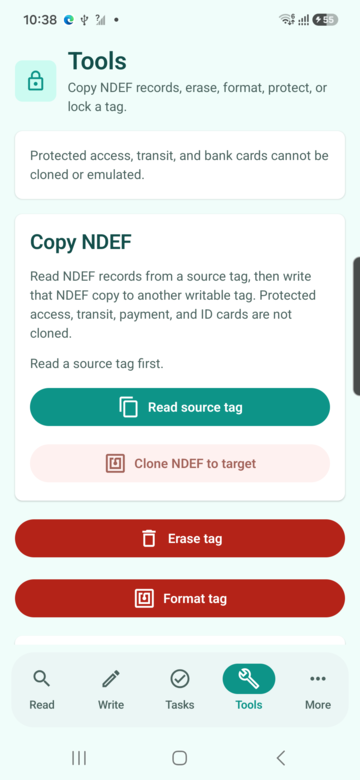
A phone can detect a payment, transit, identity or access card without receiving its protected application data. Detection proves only that radio negotiation occurred; secure files, keys and commands remain governed by the card protocol, issuer policy and reader authorization.
- Non-NDEF is not empty
- A card that exposes no NDEF message may still contain structured applications reached through IsoDep or a proprietary technology.
- Responsible output
- Show supported technology and an honest limitation rather than labelling protected content as corrupt or suggesting that it can be cloned.
Troubleshoot missed or interrupted reads
Separate discovery failures from data failures. If the phone never reacts, check hardware, settings, placement and interference; if discovery occurs but reading fails, keep the tag steady, retry with a reference label and record the technology and exact exception.
- TagLostException
- This normally means the RF connection ended while an operation was active, so repositioning and a fresh scan are safer than reusing the previous handle.
- Device matrix
- Test at least two physical phones when investigating repeatable failures because antenna geometry and controller firmware vary between models.
Handle discovered content safely
Treat an NFC payload as untrusted input even when the label looks familiar. Display the decoded destination, require confirmation for sensitive actions and avoid silently opening unknown schemes, downloading files or running automation merely because a tag entered the field.
- URL review
- Normalize and show the effective host before navigation so lookalike domains and unexpected redirects remain visible to the user.
- Physical proof
- Unit tests can validate parsers and state transitions, but RF reliability claims still require a real Android phone and representative tags.
Quick reference
| Result field | What it tells you | What it does not prove |
|---|---|---|
| Technologies | Protocols exposed during this tap | Card purpose or authorization |
| UID | Identifier returned by discovery | Cryptographic authenticity |
| NDEF | Interoperable public records | Access to protected files |
| Writable | Current NDEF write capability | Reversible permanent locks |
Related NFCMagic app screens
These screenshots connect this how to read an NFC tag on Android guide to the related Android workflow in NFCMagic. They document interface states; radio behavior still requires a physical Android device and real tags.
Frequently asked questions
Why does my Android phone not react to an NFC tag?
Confirm the exact phone variant has NFC, enable it in settings, remove metal accessories and move the tag slowly across the rear antenna area.
Can Android read an NFC tag through a phone case?
Thin plastic cases usually work, while metal plates, magnetic wallets and thick accessories can reduce or block coupling.
Does reading a UID mean the card can be copied?
No. A visible identifier is not the secret credential or cryptographic proof used by a properly designed secure system.
Can an Android emulator test NFC reading?
No. Emulator tests cover application logic, but antenna placement, tag loss and RF communication require a physical phone and tag.
Primary technical sources
- Android Developers: NFC overview — Official overview of Android reader/writer mode, card emulation and tag discovery.
- Android Developers: NFC basics — Official NDEF dispatch, record construction and Android 16 URL-tag behavior.
- Android Developers: Advanced NFC — Official guidance for NDEF operations, raw technologies and foreground dispatch.
- Android Developers: Ndef API — API contract for connection state, maximum size, writability, reads, writes and read-only conversion.
- NXP: NTAG213, NTAG215 and NTAG216 — Manufacturer capacities, lock features, RF behavior and intended tag applications.