Technical Standard & Mobile Toolkit

QR Code Technology, Standards and Android Workflows

From Toyota assembly lines in 1994 to modern high-speed optical scanning, explore the science of ISO/IEC 18004 matrix barcodes, Galois Field Reed-Solomon error correction, and how NFCMagic brings professional QR generation and scanning to Android.

ISO/IEC 18004 Standard Reed-Solomon GF(2^8) EC 11 Payload Formats Logo Overlay Engine Google ML Kit Vision
NFCMagic QR Code Generator interface on Android

Download the app · unlock Trackable QR

See every QR open. Know where it happened.

Create a QR in the NFCMagic Android app and enable Trackable. Every open is counted, then the QR owner can privately review IP address, approximate country, region, city and coordinates, device type, operating system, browser, language, referrer and exact server time inside the app.

DOWNLOAD NFCMagic FREE ON GOOGLE PLAY Try the free static QR generator
https://play.google.com/store/apps/details?id=com.trustqr.nfcmagic
Every openCounted
LocationIP-estimated
Device dataBrowser · OS · type
Who sees it?Owner only

How actions continue: web destinations redirect after the event is recorded. Wi-Fi and protected actions use a confirmation hand-off because Android does not permit silent connections or privileged actions. Location is estimated from IP and is not GPS.

Historical Evolution

1. History and Origin: The Invention of Quick Response Codes

The Quick Response (QR) code was invented in 1994 by Masahiro Hara and a dedicated team of optical engineers at Denso Wave, a Japanese subsidiary of the Toyota Group. At the time, industrial manufacturing lines relied on conventional 1D linear barcodes (such as UPC-A and Code 39) to track automotive parts and component bins during vehicle assembly.

However, 1D barcodes were constrained by extreme storage limitations—holding a maximum of 20 to 30 alphanumeric characters per barcode. In fast-paced Toyota manufacturing plants, factory technicians had to scan up to ten separate 1D barcodes on every single parts box to read serial numbers, batch codes, and component destinations. This created severe operational friction, scanning fatigue, and throughput delays.

To eliminate this bottleneck, Masahiro Hara embarked on designing a two-dimensional matrix barcode capable of encoding thousands of characters while maintaining ultra-fast, 360-degree omnidirectional optical readability under harsh industrial lighting and dirty factory environments.

A pivotal moment in technological history occurred when Denso Wave opted to make the QR code specification an open standard and declared that it would not exercise its patent rights. This altruistic decision paved the way for global adoption—turning the QR code into an indispensable foundation for smartphone scanning, digital payments, logistics, public transit, and interactive product experiences worldwide.

For primary historical documentation, visit the official Denso Wave History Archives.

International Standards

2. Scientific & Mathematical Architecture (ISO/IEC 18004)

The international standard ISO/IEC 18004 defines the formal specification for QR code symbols, regulating module geometry, symbol versions, data encoding modes, error correction parameters, and masking algorithms.

2.1 Module Grid & Version Variations

A QR code is constructed from a square grid of dark and light elements called modules. Symbol sizes range from Version 1 (21 × 21 modules) up to Version 40 (177 × 177 modules). Each step up in version increments the symbol dimensions by 4 modules per side according to the linear equation:

Dimension = 21 + 4 × (Version - 1) modules

Deep-Dive Engineering Guide

How Much Data Can a QR Code Store? QR Code Capacity Explained

Read our in-depth technical analysis on maximum storage limits (7,089 numeric, 4,296 alphanumeric, 2,953 binary bytes), Reed-Solomon error correction trade-offs, static vs dynamic QR codes, and print reliability.

2.2 Functional Pattern Topography

Every standard QR symbol embeds critical structural patterns that guide computer vision decoders:

  • Finder Patterns (Position Detection Patterns): Located at three corners (top-left, top-right, bottom-left). Each finder pattern consists of a 7×7 dark square containing a 5×5 light square containing a 3×3 dark square. This creates an invariant concentric width ratio of 1:1:3:1:1 across any scan line, allowing smartphone camera decoders to locate and orient the barcode instantly at any 360-degree rotation angle.
  • Alignment Patterns: Present in Version 2 and larger. These smaller inner concentric squares compensate for physical surface distortion, bending on rounded product packaging, or camera lens tilt.
  • Timing Patterns: Alternating dark and light modules connecting the finder patterns vertically and horizontally, establishing precise grid coordinate axes for module sampling.

2.3 Reed-Solomon Error Correction Math (Galois Field \(GF(2^8)\))

QR codes achieve remarkable resilience against physical damage, dirt, and tears by employing Reed-Solomon error correction algorithms operating over finite Galois Fields \(GF(2^8)\) with the generator polynomial \(p(x) = x^8 + x^4 + x^3 + x^2 + 1\).

ISO/IEC 18004 specifies four distinct Error Correction (EC) levels:

EC Level Recovery Capacity Engineering Application
Level L (Low) ~7% data codewords restored Clean digital screens, maximum text capacity
Level M (Medium) ~15% data codewords restored Standard print labels, commercial packaging
Level Q (Quartile) ~25% data codewords restored Industrial outdoor signage, factory environments
Level H (High) ~30% data codewords restored Custom Logo Embedding & Brand Artwork in NFCMagic

Because Level H error correction can recover up to 30% corrupted or covered modules, NFCMagic leverages High-level parity blocks to safely embed central brand logos into the QR canvas without triggering optical decodability errors!

Engineering Guide: Reed-Solomon Recovery

How QR Code Error Correction Works: A Complete Guide to L, M, Q and H Levels

Read our comprehensive breakdown of Reed-Solomon math, damage location impacts, why logo embedding works, and choosing the right correction level for print and packaging.

For scientific research on error correction, consult the MIT Applied Mathematics Portal or the official ISO/IEC 18004 Standard Page.

2.4 Data Masking Evaluation Algorithms

To eliminate undesirable pattern artifacts (such as large solid black boxes or accidental pseudo-finder patterns that confuse camera sensors), one of 8 mathematical mask patterns is applied to payload modules via Bitwise XOR logic. The encoder calculates penalty points across four conditions (N1: adjacent modules of same color, N2: 2×2 blocks of same color, N3: 1:1:3:1:1-like patterns, N4: dark/light module imbalance) and selects the mask with the lowest total penalty score.

Data Format Contracts

3. Payload Syntax Specifications and 11 Supported Types

A QR code is a physical data carrier. Modern mobile operating systems decode the raw string payload and map it to intent handlers based on standardized URI schemas:

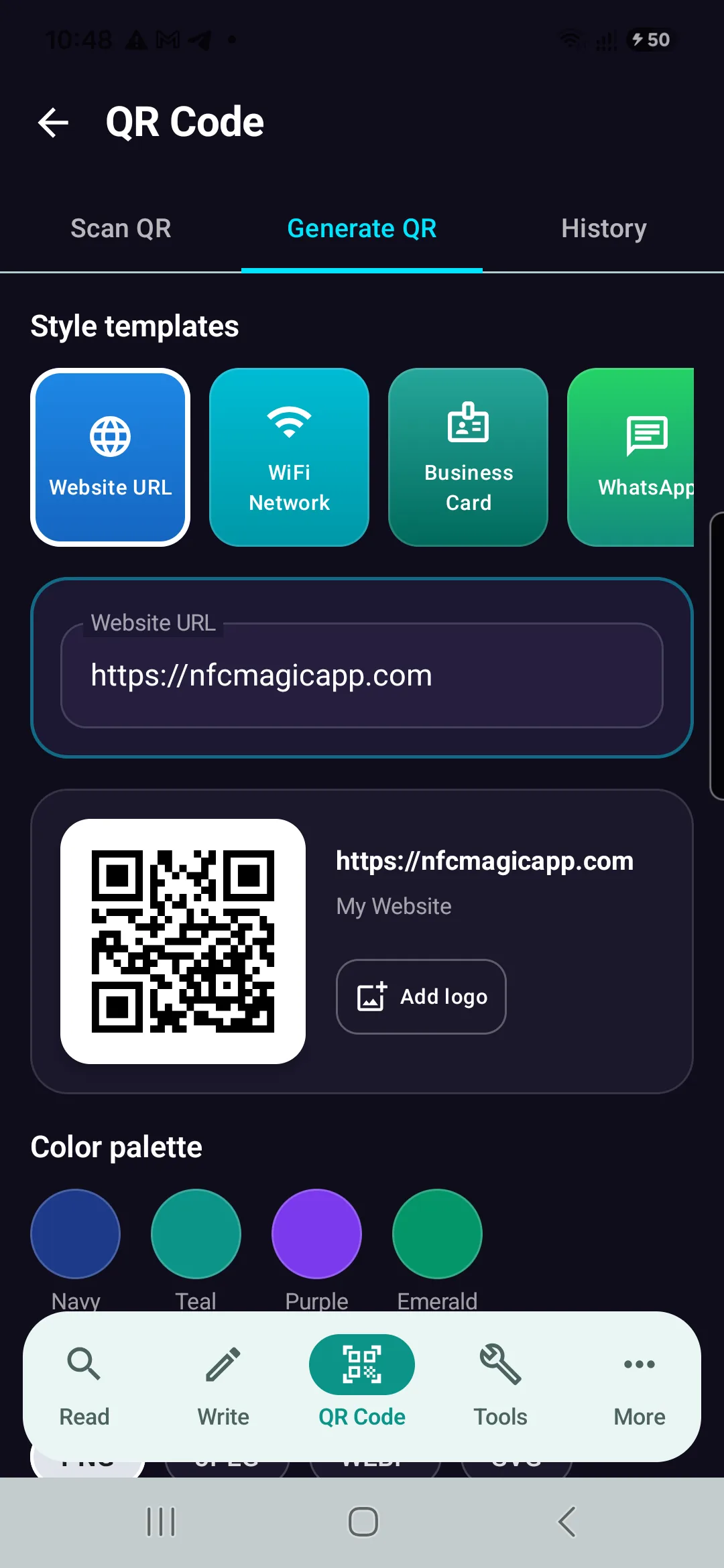
  • Website URL (HTTP/HTTPS): https://nfcmagicapp.com — Direct web browser navigation.
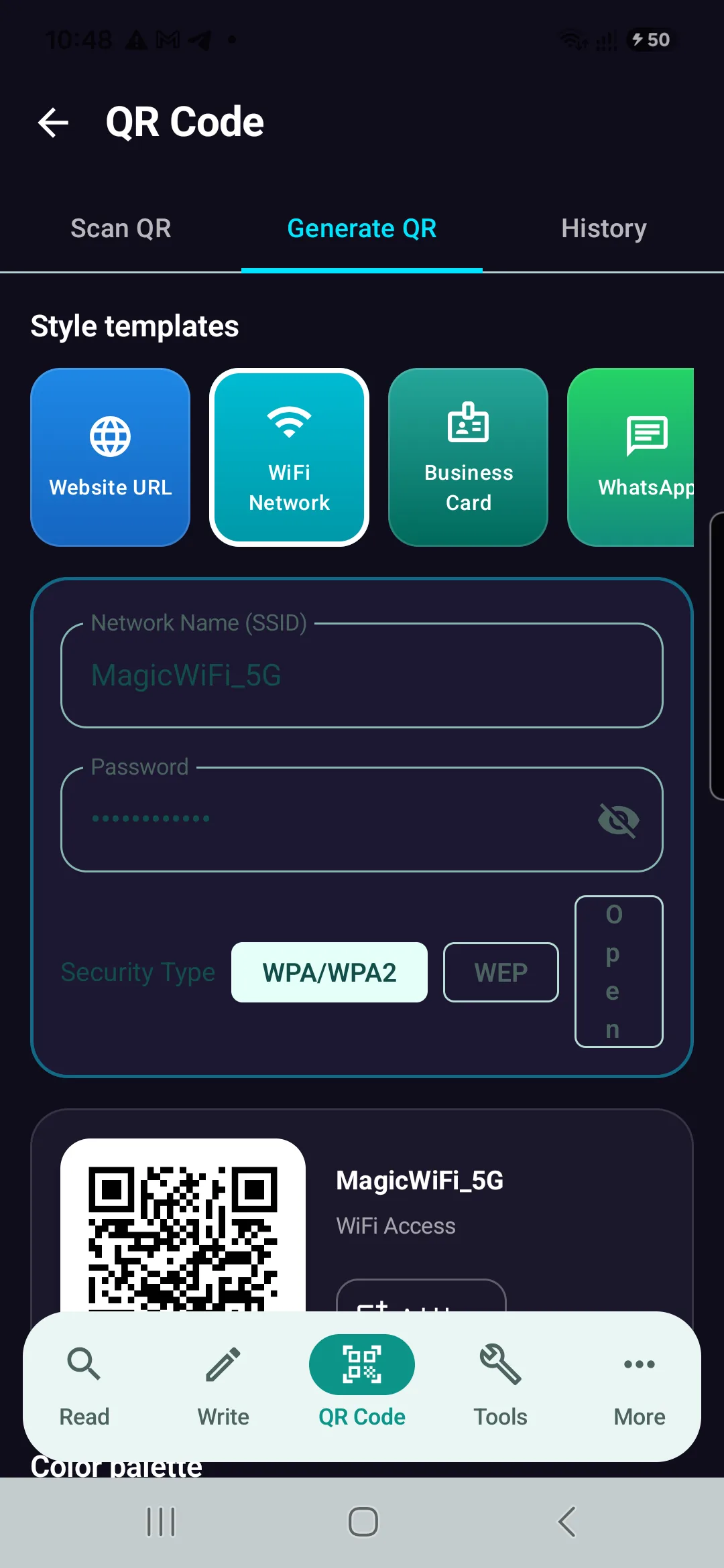
  • WiFi Credentials: WIFI:S:MagicWiFi_5G;T:WPA;P:Password123!;; — Triggers instant zero-touch Wi-Fi onboarding on Android and iOS devices.
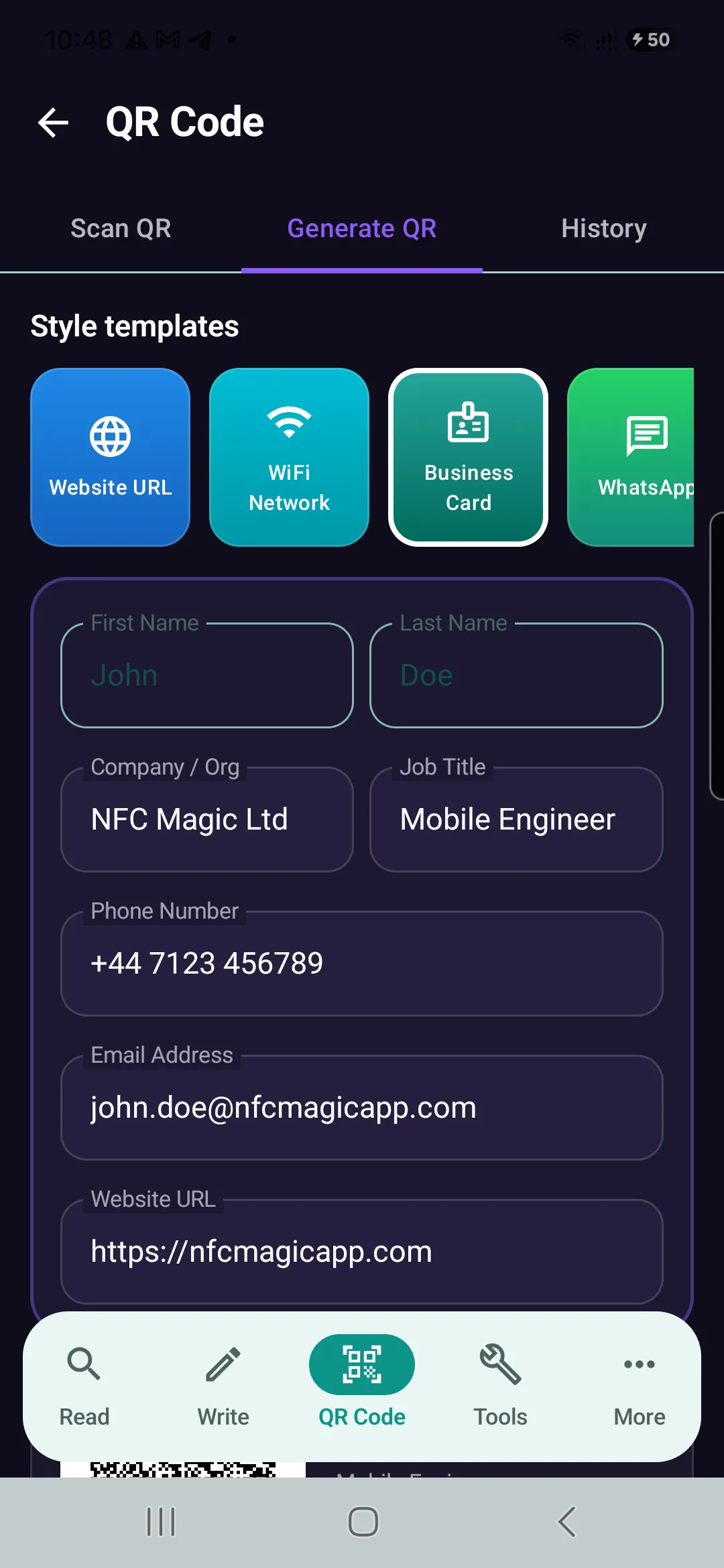
  • Digital Business Card (vCard 3.0):
    BEGIN:VCARD
    VERSION:3.0
    N:Doe;John;;;
    FN:John Doe
    ORG:NFC Magic Ltd
    TITLE:Mobile Engineer
    TEL;TYPE=CELL:+447123456789
    EMAIL:john.doe@nfcmagicapp.com
    URL:https://nfcmagicapp.com
    END:VCARD
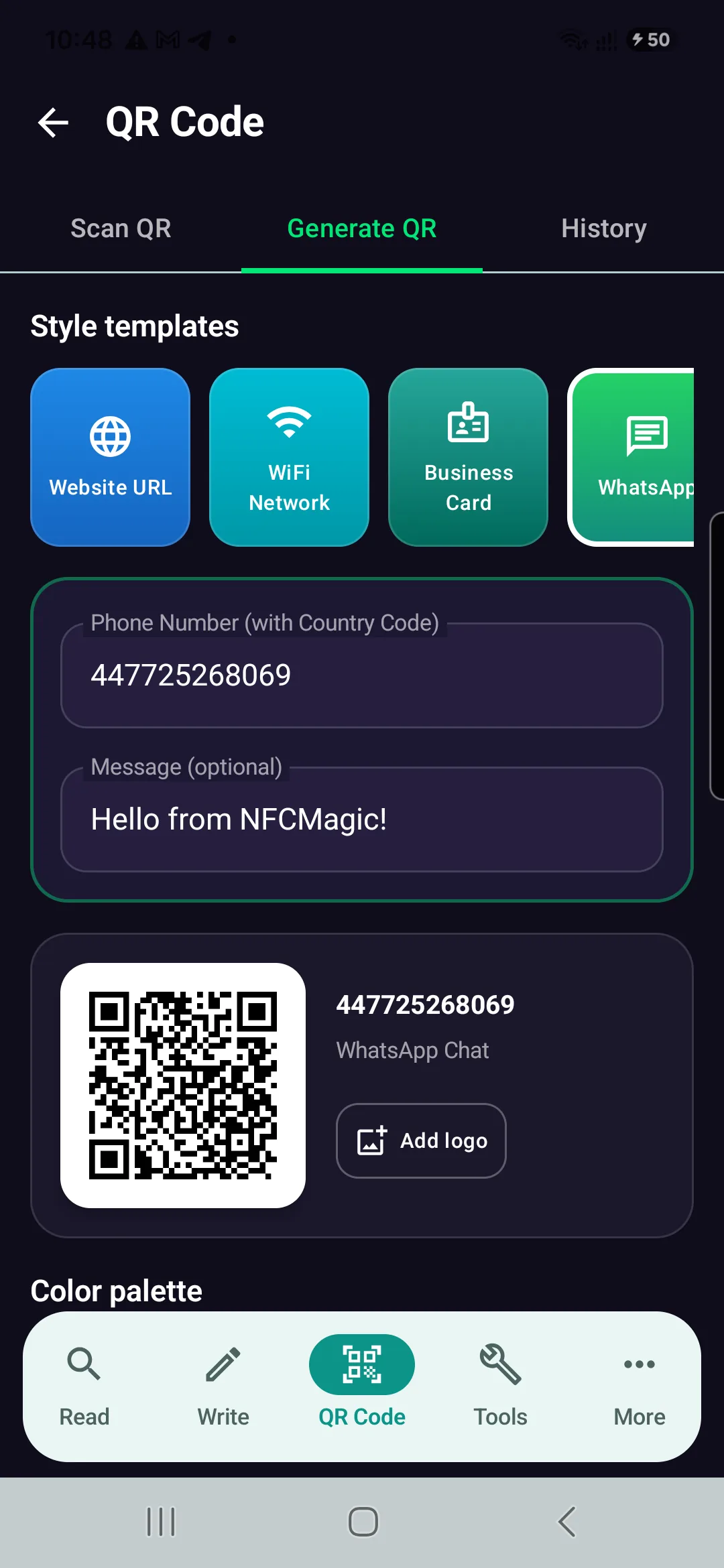
  • WhatsApp Direct Chat: https://wa.me/447725268069?text=Hello%20from%20NFCMagic — Opens direct messaging chat without requiring the user to save the contact number first.
  • Instagram Profile: https://instagram.com/nfcmagic.app — Opens native Instagram profile or web app.
  • Google Play Store App Link: market://details?id=com.trustqr.nfcmagic — Opens native Play Store installation sheet.

Android Software Architecture

4. Mobile Engineering: Android Computer Vision & Rendering Pipelines

Building a high-performance native Android QR reader and generator requires robust computer vision decoders and anti-aliased graphics rendering pipelines:

4.1 Google ML Kit Barcode Vision API vs ZXing

In NFCMagic, camera stream decoding and gallery image analysis are powered by com.google.mlkit:barcode-scanning. Unlike legacy ZXing CPU decoders, ML Kit utilizes hardware-accelerated machine learning models (NNAPI / GPU backends). This guarantees instant recognition even under severe motion blur, low light, extreme perspective angles, and partial occlusions.

Computer Vision & AI Machine Learning Guide

Can AI Recover a Damaged QR Code? AI QR Code Reconstruction Explained

Read our deep-dive analysis on how AI neural networks, deblurring models, super-resolution, and video multi-frame alignment work together with Reed-Solomon error correction to restore degraded QR codes.

Troubleshooting & Optics Guide

How to Scan Blurry and Low-Resolution QR Codes

Learn practical solutions for scanning out-of-focus or motion-blurred QR codes, camera focus adjustments, lighting optimizations, and low-resolution recovery.

Read developer documentation at the Google ML Kit Vision Portal.

4.2 Vector SVG vs Raster Export Pipelines

For commercial signage and packaging, raster images (PNG, JPEG, WEBP) can suffer from resolution degradation when enlarged. NFCMagic features a dedicated Vector SVG export engine, generating clean XML vectors that scale endlessly for billboard printing without pixelation.

Universal Physical Touchpoints

5. Hybrid NFC + QR Code Architecture

While NFC tags (such as NTAG 213, NTAG 215, and cryptographic NTAG 424 DNA SUN/CMAC) deliver instant zero-tap interactions, camera-first users or legacy devices may lack active NFC radios.

NFCMagic introduces a Hybrid NFC + QR Architecture. Smart labels, restaurant table discs, and product packaging pair an NFC chip with a companion printed QR code pointing to the exact same payload or Dynamic Smart Tag Link—guaranteeing 100% device compatibility across all mobile users.

Real Device Screenshots

Native NFCMagic Android Interface Showcase

Explore authentic app screenshots captured directly from physical Android devices running NFCMagic across multi-format QR templates with realistic test data.

NFCMagic QR Generator interface on Android device showing top style templates, direct input form, live preview box, and Save/Share action buttons

Overview & Template Selection

Horizontal gradient template tiles, direct input fields, live QR canvas, Add Logo button, and Save/Share actions.

NFCMagic WiFi QR Code Generator screen showing SSID MagicWiFi_5G, WPA security and live QR preview

WiFi Network QR Generator

Zero-touch Wi-Fi network joining with automatic WPA/WPA2 credential formatting.

NFCMagic vCard 3.0 Digital Business Card QR Generator screen

vCard 3.0 Digital Business Card

Structured digital contact cards containing full name, organization, title, phone, email, and website.

NFCMagic WhatsApp Direct Chat QR Generator screen

WhatsApp Chat QR Generator

Direct messaging links with international phone formatting and pre-filled custom messages.

Continue Reading

Related QR Code Engineering Guides

Deep dive into the science, optics, standards, and error correction behind QR codes.

Troubleshooting

How to Scan Blurry QR Codes

Learn how to scan low-resolution codes, adjust camera focus, and why optical decoders fail.

Troubleshooting

QR Code Motion Blur

Why moving QR codes are hard to scan and how motion blur affects barcode decoding.

Computer Vision

Damaged QR Code Recovery

Can you scan an incomplete or scratched code? Complete guide to damage recovery.

Print & Production

Print-Scan Degradation

How repeated compression, resizing, and printing affect QR code survival and reliability.

Format Comparisons

QR Code vs Barcode

Compare QR codes and barcodes, including data capacity, speed, and error correction.

AI Technologies

AI QR Code Generator

How AI can optimize QR codes for real-world reliability, contrast, and layout.

Design & Customization

Human vs Machine Readable

How visual context interacts with machine-readable encoding in artistic QR codes.

Design & Customization

Color QR Codes Explained

Learn how color QR codes work and how to maintain high scanning reliability.

Next Generation

Multi-Layer QR Codes

Can a QR code store more information? Learn about experimental multi-layer systems.

Next Generation

The Future of QR Codes

Explore the future of QR codes, AI, physical capacity limits, and next-gen readers.

Complete QR library

All QR code articles

Browse every NFCMagic guide about QR generation, scanning, encoding, error correction, printing, damage recovery and NFC-plus-QR product experiences.

QR guide How to scan and generate QR codes on Android

Learn how to scan and generate QR codes on Android, validate decoded content, choose error correction, preserve the quiet zone and export reliable print-ready assets.

QR guide NFC vs QR code: which should you use?

Compare NFC vs QR code for cost, speed, compatibility, durability, security, analytics and accessibility, then choose one channel or a coordinated dual-label experience.

QR guide Can you track QR code scans in Canva?

Find out when Canva QR codes can be tracked, why a static Canva code can never report scans, and free ways to count scans without a Canva Business plan.

QR guide Are QR codes trackable? What a scan reveals

Learn which QR codes can be tracked, exactly what data a tracked scan collects, what it can never reveal about the person scanning, and how to track scans responsibly.

QR guide Can AI Recover a Damaged QR Code?

Learn how AI can help recover damaged QR codes, how QR code readers handle missing data, and where machine learning can improve QR code reconstruction.