Direct answer
Build safe tap-triggered NFC automation on Android with task profiles, conditions, permissions, webhooks, Home Assistant, MQTT, retries and audit states.
The architecture behind one tap
A robust automation separates tag discovery, trigger matching, policy evaluation and action execution. The physical tag identifies or carries a task reference; the application decides whether the context and permissions allow that task now.
- Trigger
- Match an app-owned record or explicitly enrolled tag rather than executing arbitrary instructions from every detected UID.
- Executor
- Each action should return a structured success, denied, unsupported or retryable result for the workflow summary.
Design reusable task profiles
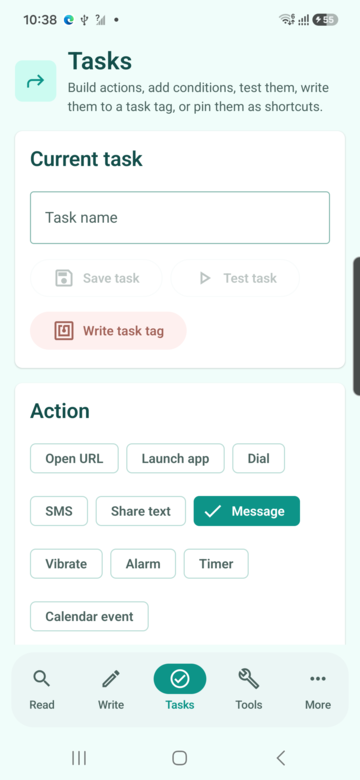
A profile gives the automation a name, ordered actions, parameters and version. Small focused profiles are easier to audit and reuse than one large routine that changes connectivity, sends data and launches several apps without a clear outcome.
- Preview
- Show the resolved action list and destinations before saving or writing the trigger.
- Versioning
- When a saved profile changes, record whether deployed tags point to the latest profile or embed an older fixed payload.
Apply conditions before actions
Time, network, battery and previous-state conditions let one tap behave deliberately without hiding the logic. Conditions must be visible in plain language so the user can explain why a branch ran or was skipped.
- Evaluation snapshot
- Read condition inputs once per execution to avoid different actions observing inconsistent time or network state.
- Safe default
- If a required signal is unavailable, stop or choose an explicit fallback instead of silently taking the more destructive branch.
Respect modern Android permission limits
Android restricts many background and system-setting operations. NFCMagic should request permissions only when the selected action needs them, explain unsupported operations and route users to an approved system screen where direct control is unavailable.
- No fake success
- An action that opens Settings is not the same as changing the setting; the result must describe what actually happened.
- User initiation
- Communications, notifications and sensitive system changes require consent and should not be disguised as an automatic side effect of an unknown tag.
Connect webhooks, Home Assistant and MQTT
External connectors turn the tap into an authenticated network request while the receiving platform controls lights, machines or records. Store the user-configured endpoint securely and validate schemes, hosts and payload templates before enabling execution.
- Webhook
- Use HTTPS, bounded timeouts and an allowlisted method and content type; never send a request merely because an untrusted tag contains a URL.
- Broker or home hub
- Treat credentials and tokens as secrets, and let the external system enforce authorization for every topic, scene or automation.
Prevent duplicate execution
A tag can remain in the field long enough to be observed again, and a user can tap twice while waiting for a network result. Debounce discovery locally and attach an idempotency key to network operations that must occur only once.
- Local gate
- Combine enrolled trigger, session state and a short time window instead of blocking every future tap of the same tag.
- Remote gate
- The backend should remember operation identifiers for an appropriate period so a timeout retry cannot create duplicate work orders or messages.
Retries, offline behavior and compensation
Separate actions that can be retried from actions that have an irreversible external effect. Queue only bounded, authorized work and show pending state; do not claim an automation completed while the receiving system has not acknowledged it.
- Backoff
- Use limited exponential retry for transient network failures and stop on authentication, validation or policy denial.
- Compensation
- For multi-step routines, document whether later failures leave earlier actions in place and offer a deliberate rollback profile when safe.
Protect trusted and sensitive automations
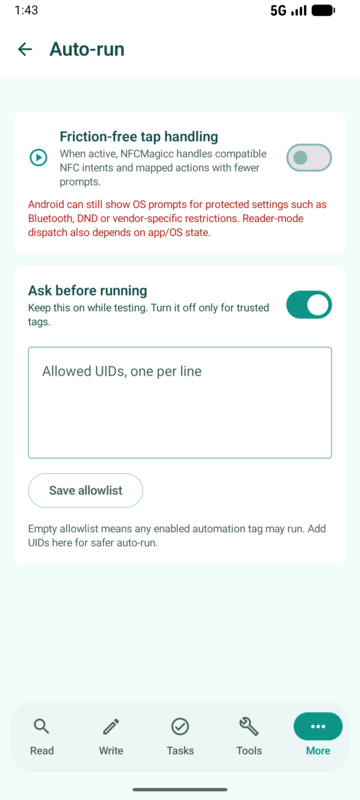
A bedside light scene and a door-control request carry different risk. Classify actions, require ask-first confirmation for sensitive categories and allow trusted auto-run only for enrolled tags and visible active sessions.
- Allowlist
- Trust a profile and context, not every future payload that happens to use the same visible label.
- Secrets
- Do not write API tokens, alarm credentials or private broker passwords into public NDEF memory.
Practical automation patterns
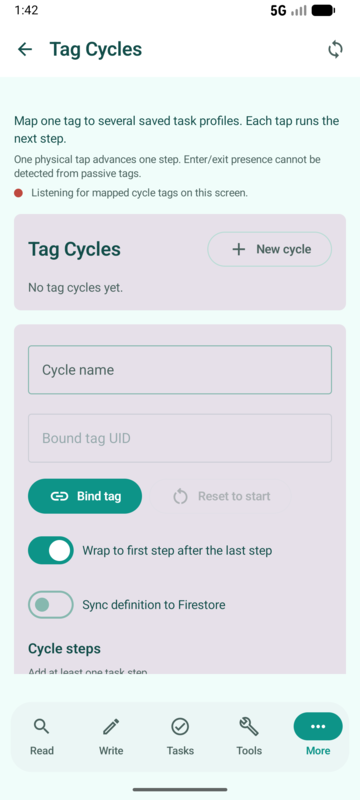
Useful routines attach to places: a workshop station opens the job sheet and starts a timer; a bedside tag advances a night and morning cycle; a maintenance label sends an authorized inspection event and opens the equipment record.
- Human checkpoint
- When an action communicates externally, show the destination and result so operators can notice the wrong asset or stale profile.
- Manual equivalent
- Every important routine needs a way to run or recover without the physical tag, such as a saved profile or home-screen shortcut.
Observe outcomes without invading privacy
An execution log should explain which profile ran, which actions succeeded and why a step failed. Avoid collecting raw UID, precise location or full payload unless the user has a defined operational need and retention policy.
- Support value
- Store structured error categories and timestamps locally so a user can diagnose a routine without sending content to the developer.
- Export control
- Let the user review and redact logs before sharing them with a support or automation administrator.
Quick reference
| Layer | Responsibility | Failure example |
|---|---|---|
| Trigger | Recognise an enrolled tag | Unknown or duplicate tap |
| Policy | Evaluate conditions and consent | Permission or rule denied |
| Executor | Perform one bounded action | Unsupported Android API |
| Connector | Deliver authenticated request | Timeout or rejected token |
Related NFCMagic app screens
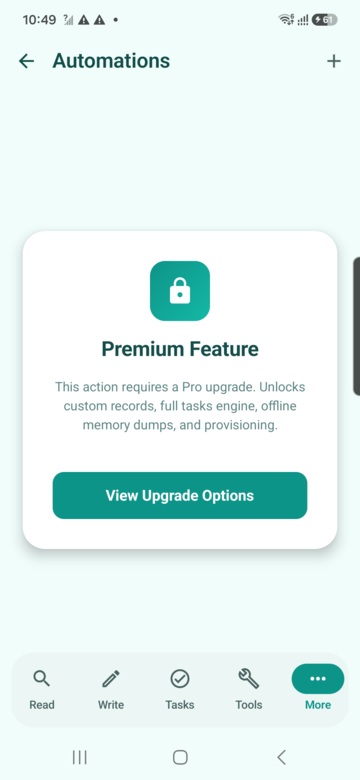
These screenshots connect this tap-triggered NFC automation guide to the related Android workflow in NFCMagic. They document interface states; radio behavior still requires a physical Android device and real tags.
Frequently asked questions
Can an NFC tag turn Wi-Fi or mobile data on silently?
Android restrictions vary by version. NFCMagic must report unsupported direct changes and use approved system flows where required.
Should webhook credentials be stored on the tag?
No. Public NDEF should carry only an enrolled identifier; secrets belong in protected app or backend storage.
How do I stop the same tap running twice?
Use a visible execution state, local debounce and server-side idempotency for external operations.
Can a routine work without the physical tag?
A well-designed task profile can also expose a manual test or shortcut path for recovery and accessibility.
Primary technical sources
- Android Developers: NFC overview — Platform overview for Android reader, writer and tag-discovery behavior.
- Android Developers: Privacy checklist — Platform guidance for data minimisation, permissions and user control.
- Android Developers: Android Keystore — Official key-storage model and hardware-backed protection guidance.