Create your free trackable QR code in the Android app.
Trackable QR code app for Android
Create trackable QR codes and see every scan
Make a QR code on your phone and find out when, where and on which devices it is scanned. Compare flyers, posters, product labels and business cards, and change the destination any time without reprinting.
One trackable QR code free
Private, owner-only analytics
Editable after printing
Works with any phone camera
QR code tracking pathways
Track scans, keep codes editable and pair QR with NFC.
Trackable QR codes are part of the NFCMagic Android app, next to the free static QR generator, dynamic NFC tags and digital menus.
Create a static QR code in your browser when you do not need tracking.
See why only codes with a managed link can be counted.
Pair a trackable QR code with an NFC tag for tap and scan access.
From print to report
Track a QR code in four steps
You create and manage codes in the NFCMagic Android app. People scanning the code need only their normal phone camera.
1
Enter the destination
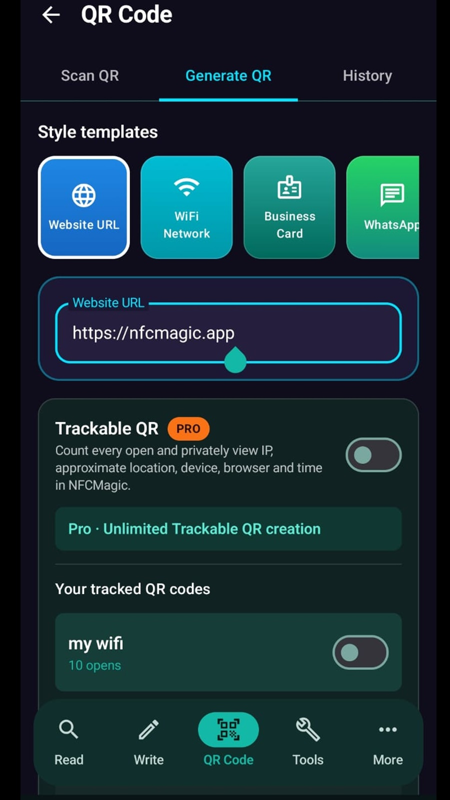
Open QR Code, choose Generate QR and paste the website, menu, form or social profile the code should open.
2
Turn on Trackable QR
Switch on Trackable QR so each open is counted through a managed link before the visitor is forwarded.
3
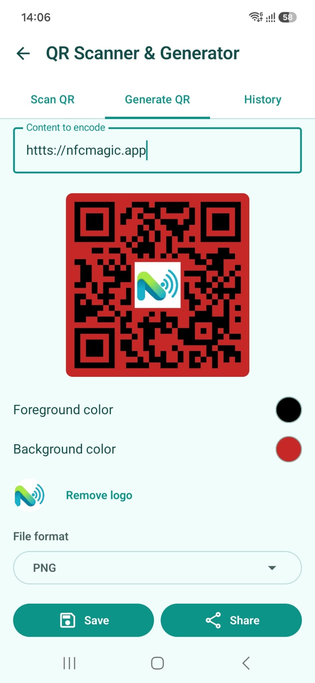
Design and export
Pick colors, add a logo and export PNG, JPEG, WEBP or SVG for flyers, packaging or a Canva design.
4
Read the report
Open Your tracked QR codes to see the number of opens and the time, approximate location and device of each scan.
Scan analytics
What each tracked scan records
The report shows the same basic details any website receives from a normal visit, and keeps them private to you.
Date and time
See exactly when each scan happened, so you can tell which days and hours your printed material works best.
Approximate location
An IP-based location shows the city or region of each scan. It is an estimate, not a street address.
Device and browser
See the device type, browser, operating system and language used to open the code.
Open count per code
Every tracked code shows its total opens, so you can compare one poster, flyer or placement against another.
Use cases
Find out which print actually gets scanned
Create one trackable code per placement, then compare their reports.
Flyers and posters
Put a different code on each poster location or flyer version and see which one brings people in.
Product packaging and labels
Learn where your products are being scanned, and update the landing page later without new packaging.
Business cards and events
See how many people actually open your card or event badge link after you meet them.
Restaurant menus
Measure how often the table QR code is opened. See the Restaurant Menu Maker for full digital menus.
Privacy
Tracking that respects the people scanning
A scan never reveals a person's name, phone number or contacts. Precise GPS location is only possible if the visitor allows the browser's location request. Reports stay private to the code owner and are never sold. Read the privacy policy for details.
Guides
Learn more about QR code tracking
Are QR codes trackable?
What a scan does and does not reveal, and how to track responsibly.
Can you track QR code scans in Canva?
Options for static and dynamic Canva codes, including free methods.
FAQ
Trackable QR code questions
Is the trackable QR code free?
Yes. Every NFCMagic user can create one trackable QR code for free. NFCMagic Pro unlocks unlimited trackable QR codes.
What does a tracked scan show?
Each open records the date and time, the public IP address with an approximate location, and the device, browser, operating system and language.
Can I see who scanned my QR code?
No. Scan reports describe devices and approximate areas, not names, phone numbers or email addresses.
Who can see my scan analytics?
Only you. Trackable QR analytics are private to the code owner, and NFCMagic does not sell them.
Can I change where the code points after printing?
Yes. Because a trackable code uses a managed link, you can update the destination later without reprinting the code.
Is there an iPhone app?
NFCMagic is currently an Android app. People scanning your code can use any phone with a camera, including iPhones.