Turn a physical NFC tap into an Android workflow or smart-home trigger.
Features
Every NFCMagic capability, mapped to a real workflow.
This page is written for developers, product owners and professional installers who need exact boundaries, not marketing fog.
Feature pathways
Each feature is linked to the practical guide users search for.
Use the app for NFC reading, NDEF writing, QR generation, task automation, batch operations, business cards, dynamic tags and product authenticity planning.
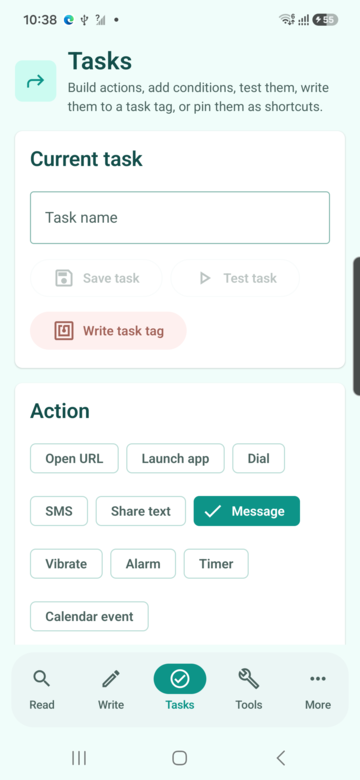
Prepare repeated tags for operations, events, labels and installers.
Build NFC business cards that stay useful after contact details change.
Create a branded digital menu with table ordering and restaurant management.
Get the app
Get NFCMagic on Google Play
NFCMagic is available on the Google Play Store. Install it on any Android 7.0+ device in a couple of taps.
Complete app map
All app screens with screenshots and practical scenarios
Every user-facing route is represented with a device capture or product preview and a scenario explaining why that screen exists.
App capability
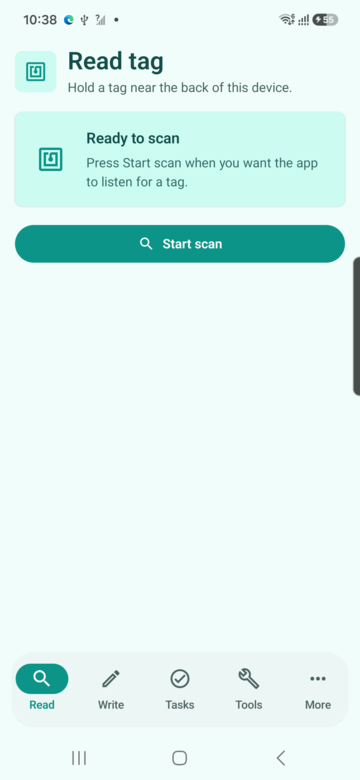
Read tags
Tag type, UID, NDEF records, capacity, write access
User flow: Tap Start scan, keep the phone still on one tag, read the result, then choose Scan again only when you are ready.
Practical scenario: A field technician taps an unknown label, confirms it is writable, checks capacity, and reads the public NDEF content before deciding whether it can be reused.
Examples
- A shop owner checks whether a printed smart label is still writable before updating its URL.
- A support technician detects that a customer tag is write-protected and explains why it cannot be changed.
- A warehouse operator confirms whether a tag contains a public URL, contact, Wi-Fi or text record before reusing it.
Where it helps
- Field support
- Retail labels
- Asset tracking
- Product packaging
App capability
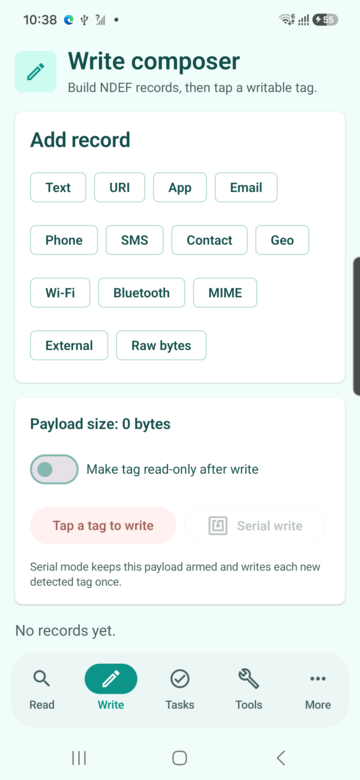
Write composer
Create NDEF payloads and save reusable profiles
User flow: Choose or create a payload profile first, then arm writing. The write action should only be active when the payload is valid.
Practical scenario: A product team prepares a URL, Wi-Fi credential or contact payload once, saves it as a profile, then writes it to a small batch of compatible tags.
Examples
- A restaurant writes table tags that open the current menu.
- A conference team writes Wi-Fi and event URL tags for visitor desks.
- A sales team writes digital business card tags for staff badges.
Where it helps
- Hospitality
- Events
- Sales teams
- Facilities
App capability
Task automation
Build tap-triggered workflows with conditions
User flow: Create a task profile, select the actions, save it, then write or bind it to a tag. Android-only actions run on the device; smart-home actions should use a webhook or automation platform.
Practical scenario: A workshop user creates a tag that opens a job sheet, starts a timer, shares status text and only runs when the right network or time condition is met.
Examples
- Night routine: the user taps a bedside tag, NFCMagic triggers a Home Assistant scene that turns lights off, lowers the thermostat, arms the alarm and sets permitted phone quiet-mode actions.
- Morning routine: the next morning tap runs the reverse scene: lights on, thermostat back to daytime, weather/calendar opened, and home status sent to the family group where allowed.
- Workshop routine: tapping a bench tag opens the job sheet, starts a timer and shares a status message for the active task.
Where it helps
- Smart home
- Workshops
- Care homes
- Field service
App capability
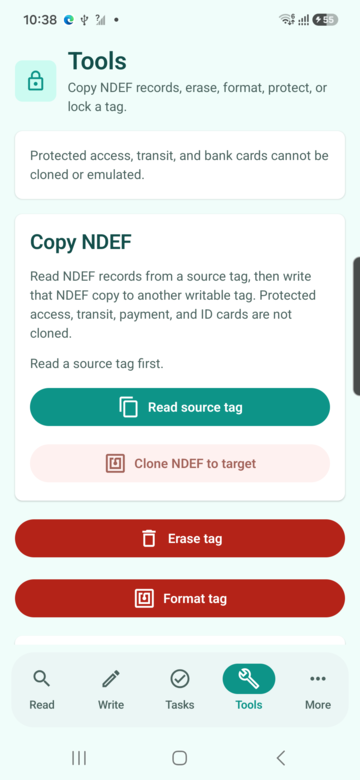
NFC tools
Copy NDEF, format, erase, protect and make read-only
User flow: Use direct operations only after the source or target state is clear. Copy NDEF reads a public source first; Clone becomes useful after a successful source read.
Practical scenario: An installer reads a source NDEF tag, confirms the source payload is valid, then writes that public payload to a clean target tag with visible result feedback.
Examples
- An installer copies a public product URL from a source tag to replacement tags.
- A maker erases test tags before a new batch writing session.
- A secure-label operator adds or removes PASS on compatible NTAG-style tags where the tag supports it.
Where it helps
- Installation
- Labs
- Retail operations
- Education
App capability
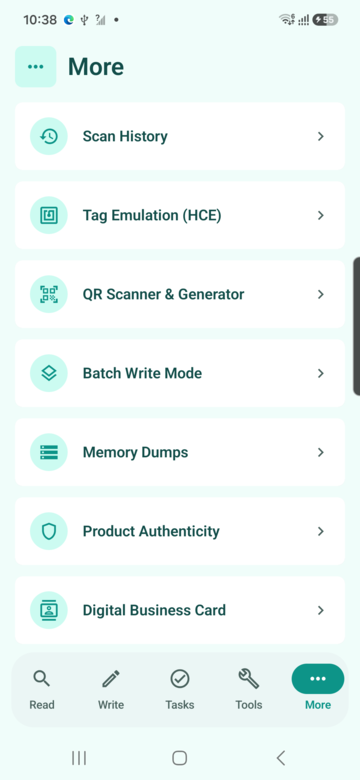
More workflows
History, HCE, QR, dumps, authenticity, cycles and analytics
User flow: Use More as the professional toolbox: history, QR, HCE, dumps, authenticity, business workflows, analytics and developer settings.
Practical scenario: A power user opens advanced workflows from one menu instead of hunting through hidden settings.
Examples
- A developer jumps from scan history to QR generation while debugging a product label.
- A business user opens analytics to understand which campaign tag gets the most taps.
- A field operator opens authenticity to inspect a secure product label.
Where it helps
- Developers
- Product teams
- Installers
- Support
App capability
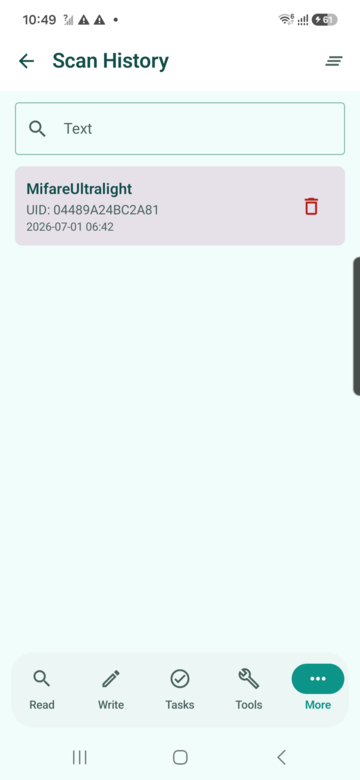
Scan history
Search, inspect and clear previous tag reads
User flow: Search previous scans by visible tag information and inspect the decoded public data without needing the physical tag again.
Practical scenario: A support engineer searches previous scans by UID, tag type or NDEF text and opens a past result without rescanning the physical tag.
Examples
- A support desk finds yesterday's scan to compare a customer report.
- A lab user records which tags were tested during a batch session.
- A QA lead checks whether a problem was tag capacity, write protection or unsupported tech.
Where it helps
- QA
- Support
- Labs
- Operations
App capability
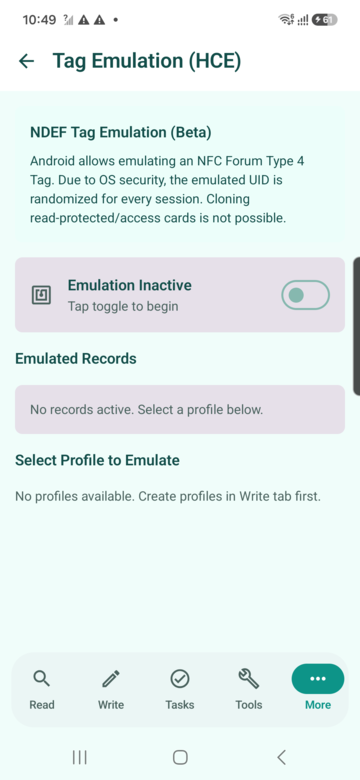
Tag emulation (HCE)
Emulate selected NDEF profiles within Android HCE limits
User flow: Select a saved NDEF profile and start an HCE test within Android platform limits. Do not expect secure-card UID cloning.
Practical scenario: A developer selects a saved profile and tests an NDEF Type 4 style sharing flow against a reader while respecting Android UID limitations.
Examples
- A developer tests how a reader reacts to a Type 4 style NDEF profile.
- A demo booth shares a contact or URL from the phone without a physical tag.
- A QA team checks reader compatibility before printing physical tags.
Where it helps
- Reader testing
- Developer demos
- QA labs
- Events
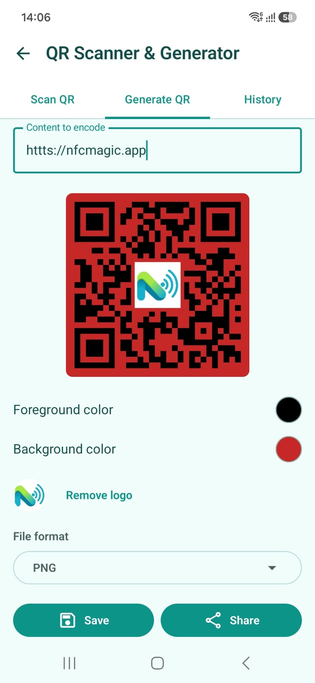
App capability
QR scanner and generator
Scan QR codes and generate QR content from text
User flow: Open More, choose QR Scanner and Generator, scan with the camera or generate a QR from text, a URL or copied tag content.
Practical scenario: A product label can carry both NFC and QR so users without NFC still reach the same destination.
Examples
- A product label carries NFC for tap users and QR for camera users.
- A technician prints a QR fallback that points to the same smart destination as the NFC tag.
- A training team generates room-specific QR codes for onboarding material.
Where it helps
- Packaging
- Education
- Hospitality
- Marketing
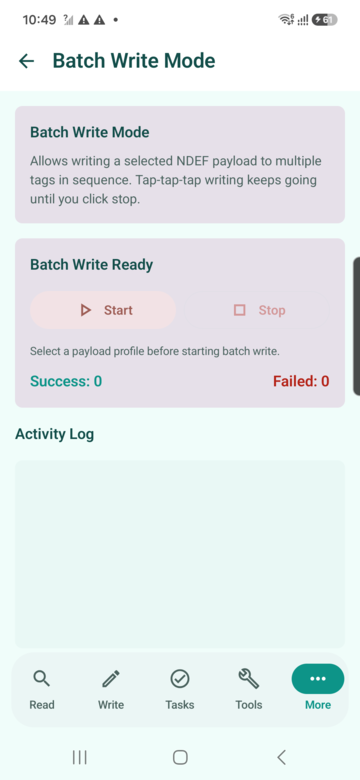
App capability
Batch write mode
Write one selected payload profile to many tags
User flow: Select one saved payload, start batch mode, tap each blank target tag, then stop when the batch is complete.
Practical scenario: An operations team selects a saved payload, starts batch mode, then taps multiple blank tags and reviews success and failure counts.
Examples
- A retail team writes 200 shelf labels with the same campaign landing URL.
- A hotel prepares identical room-service information tags.
- A factory writes safety instruction tags for multiple machines.
Where it helps
- Retail
- Hotels
- Manufacturing
- Events
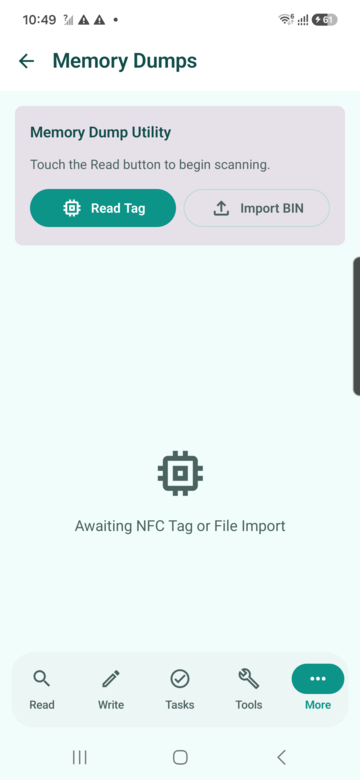
App capability
Memory dumps
Read, import, edit, export and write supported memory dumps
User flow: Use dumps for diagnostics on supported tags. Import, inspect and export only data you are authorised to handle.
Practical scenario: A lab user reads bytes from a compatible tag, exports a BIN or Flipper-style file, and inspects the hex view for diagnostics.
Examples
- A lab compares two compatible test tags byte by byte.
- A developer exports a diagnostic BIN file for reproducible testing.
- A support engineer confirms whether a writable tag has unexpected data blocks.
Where it helps
- Labs
- Diagnostics
- Embedded teams
- Support
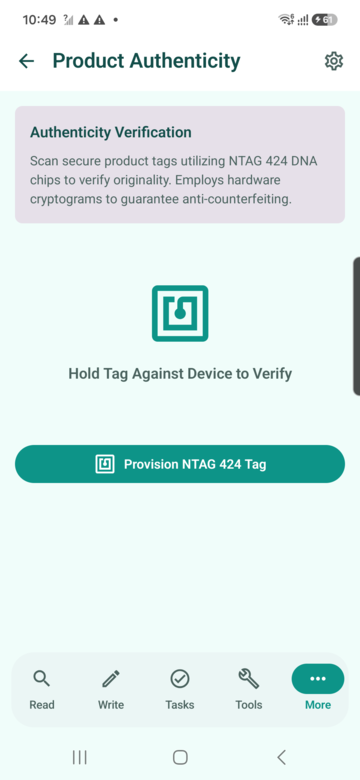
App capability
Product authenticity
Verify secure product tags with NTAG 424 DNA style flows
User flow: Tap a secure product label and interpret the result as genuine, counterfeit, pending, tamper or error according to the configured verification flow.
Practical scenario: A customer or inspector taps a secure product label and receives a clear genuine, counterfeit, pending or tamper result.
Examples
- A consumer checks a premium product before purchase.
- A distributor verifies stock before accepting a shipment.
- A brand inspector investigates suspicious packaging in the field.
Where it helps
- Luxury goods
- Pharma packaging
- Spare parts
- Brand protection
App capability
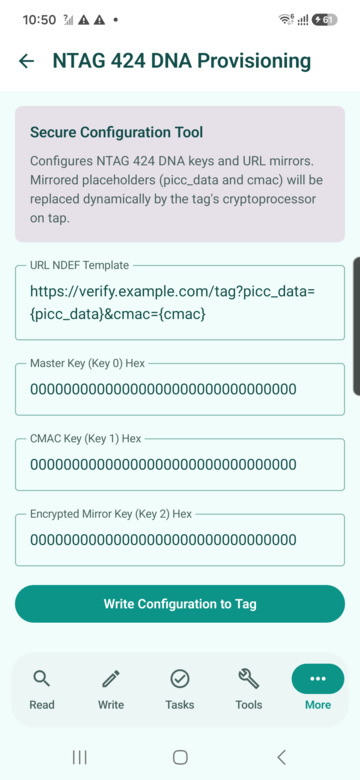
NTAG 424 DNA provisioning
Configure secure URL mirrors and AES keys for supported tags
User flow: Prepare templates and keys only in a trusted operator workflow. Provisioning changes real secure tags and must be handled carefully.
Practical scenario: A trusted operator prepares a secure tag template with dynamic mirror placeholders and writes configuration to a real NTAG 424 DNA tag.
Examples
- A brand prepares secure URL mirror tags for product authentication.
- A distributor provisions a controlled batch with production-approved settings.
- A test lab validates SUN/CMAC configuration before rollout.
Where it helps
- Brand protection
- Manufacturing
- Secure labels
- QA
App capability
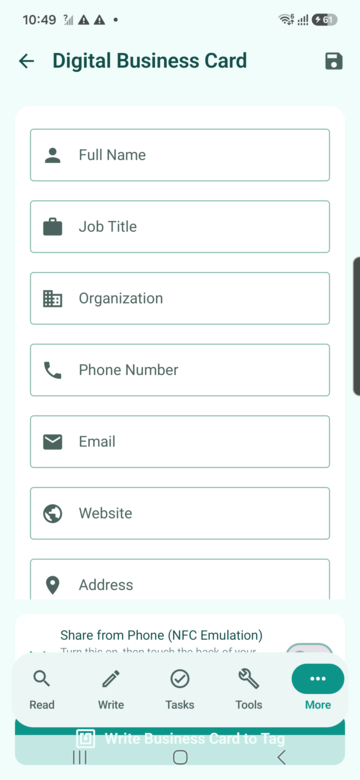
Digital business card
Create and write contact details to NFC business cards
User flow: Enter contact details, save the profile, then write it to a card tag or share it from the phone.
Practical scenario: A consultant enters contact details once, saves them, then writes the card to an NFC tag or shares directly from the phone.
Examples
- A consultant writes a card that shares name, phone, email, website and LinkedIn.
- An event team prepares staff cards before a trade show.
- A freelancer updates the digital profile without reprinting paper cards when using a dynamic link.
Where it helps
- Consulting
- Events
- Real estate
- Recruiting
App capability
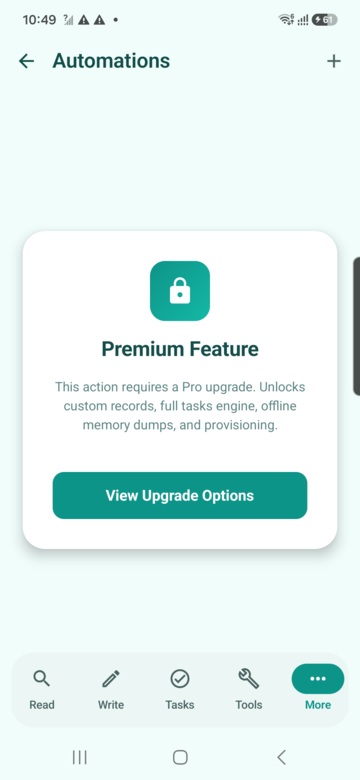
Automation connectors
Webhook, Home Assistant and MQTT-style automation setup
User flow: Connect NFC taps to webhooks, Home Assistant or MQTT-style automations where the external system performs the action.
Practical scenario: A smart-space installer links a tag UID to a webhook or MQTT topic so a tap can trigger a room, asset or service workflow.
Examples
- A warehouse tag sends a webhook that marks an asset as inspected.
- A smart-home tag triggers Home Assistant scenes for night, morning, away or guest mode.
- A maintenance tag publishes an MQTT topic that starts a machine-service checklist.
Where it helps
- Smart home
- Industry 4.0
- Warehousing
- Facilities
App capability
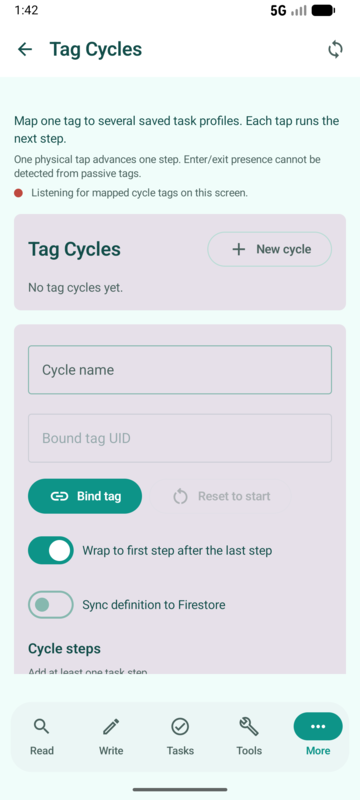
Tag cycles
One tag moves through multiple task profiles
User flow: Bind one physical tag to a sequence. Each successful tap advances to the next task, then loops or stops according to the cycle configuration.
Practical scenario: A single desk tag cycles through check-in, start focus mode and check-out actions, advancing one step per physical tap.
Examples
- First tap at bedtime runs Night mode; second tap in the morning runs Morning mode; third tap can run Away mode; the cycle then returns to the start.
- On a factory station, first tap checks the operator in, second tap starts inspection, third tap submits completion and notifies the supervisor.
- In a hotel room, first tap opens guest information, second tap requests housekeeping, third tap reports maintenance.
Where it helps
- Smart home
- Manufacturing
- Hospitality
- Healthcare rounds
App capability
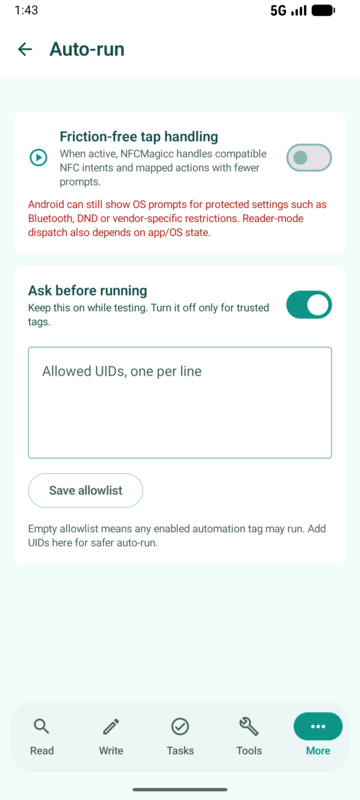
Friction-free Auto-run
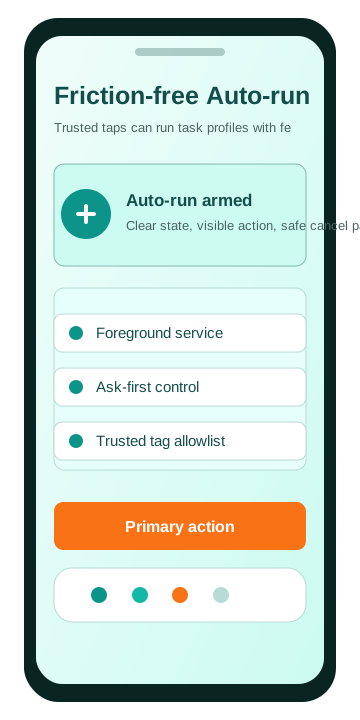
Trusted taps can run task profiles with fewer manual steps
User flow: Enable Auto-run only for a known workflow, keep the notification visible, choose ask-first or trusted mode, then tap an allowed tag. Stop Auto-run when the physical context no longer needs it.
Practical scenario: A user enables Auto-run for a trusted bedside, car or workshop tag so NFCMagic can detect the tap, show honest status, and run the selected task route with ask-first safety controls.
Examples
- Bedside tag: tap at night to run a prepared sleep routine, then tap in the morning to launch a wake routine through Tasks or a Tag Cycle.
- Car tag: tap after entering the car to open navigation, prepare a message, start a timer or trigger a smart-home leaving scene through a webhook.
- Workshop tag: tap a station tag to open the job sheet and start inspection without navigating through the app each time.
Where it helps
- Smart home
- Automotive routines
- Workshops
- Field operations
App capability
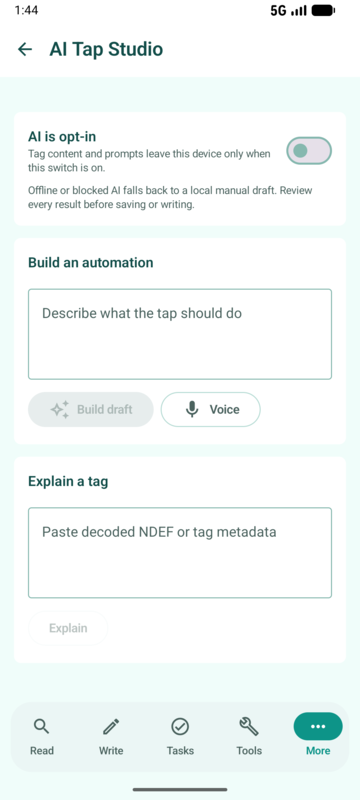
AI Tap Studio
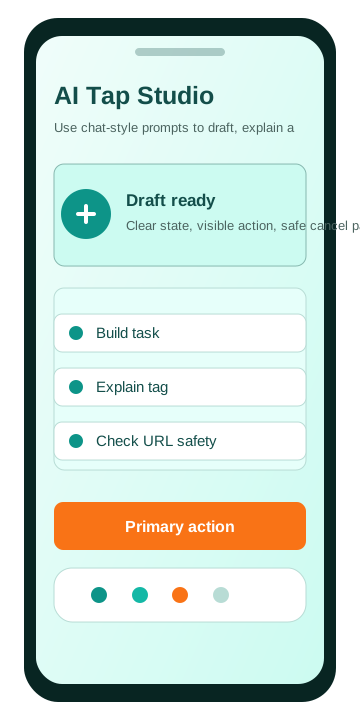
Use chat-style prompts to draft, explain and check tap workflows
User flow: Opt in, describe the routine, review the generated draft, edit the fields, then save it into Tasks. AI suggestions are helpers, not automatic permission to run unsafe actions.
Practical scenario: A user describes a routine in plain English, reviews the AI-generated task draft, edits any action fields, then saves the final profile into the existing Tasks engine.
Examples
- A user writes: 'When I go to sleep, turn off lights and open tomorrow's calendar.' AI Tap Studio drafts a task with a smart-home webhook and a calendar/open-app action.
- A technician pastes decoded NDEF text and asks for a plain-language explanation before deciding whether to trust the link.
- A shop owner asks for NFC ideas for a table tag and receives practical suggestions such as menu, allergen info, feedback form and loyalty signup.
Where it helps
- Smart homes
- Support teams
- Small businesses
- Installers
App capability
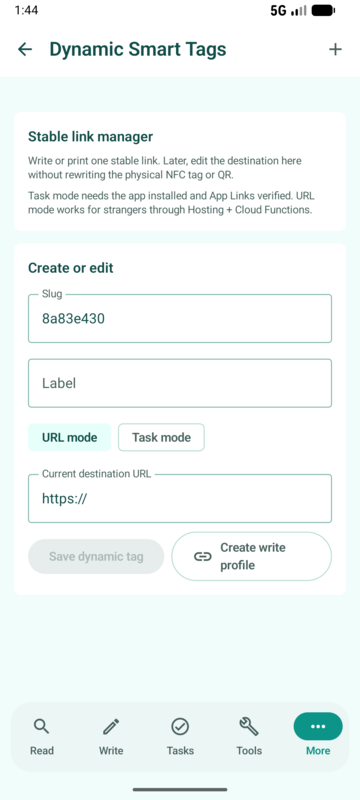
Dynamic Smart Tags
Firestore-backed URL and task tags with QR and write profiles
User flow: Create a smart tag, choose URL mode or task mode, publish the stable link as NFC and QR, then update the destination or task later from the manager.
Practical scenario: A restaurant, product team or installer writes one stable smart link to a tag, then changes URL mode or task mode later without replacing the physical tag.
Examples
- Restaurant table tag: URL mode points to breakfast in the morning, dinner in the evening and allergy information during service changes.
- Product package: the printed NFC and QR link starts as a launch page, then changes to warranty registration, support or reorder content.
- Installed equipment: task mode opens the Android app via App Links and runs the latest cached maintenance task for the asset.
Where it helps
- Restaurants
- Retail packaging
- Industrial maintenance
- Museums
App capability
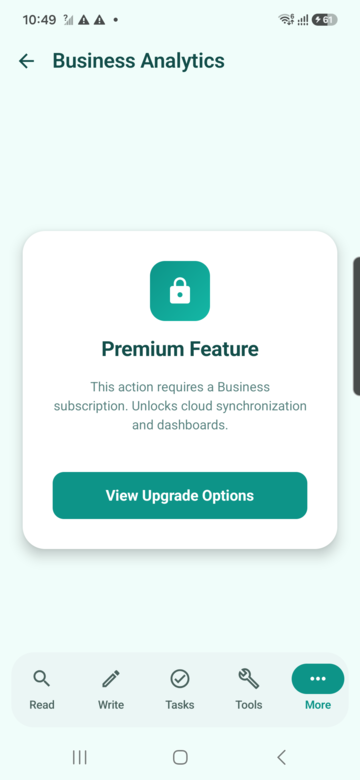
Business analytics
View tap totals, daily trends and product distribution
User flow: Review tap counts and trends to understand which labels, products or campaigns are being used.
Practical scenario: A business owner reviews scan trends and product shares to understand which tags or campaigns receive engagement.
Examples
- A brand compares QR and NFC engagement across product lines.
- A museum sees which exhibit tags visitors scan most.
- A support team spots unusual tap volume from a damaged or misprinted tag.
Where it helps
- Marketing
- Museums
- Retail
- Product analytics
App capability
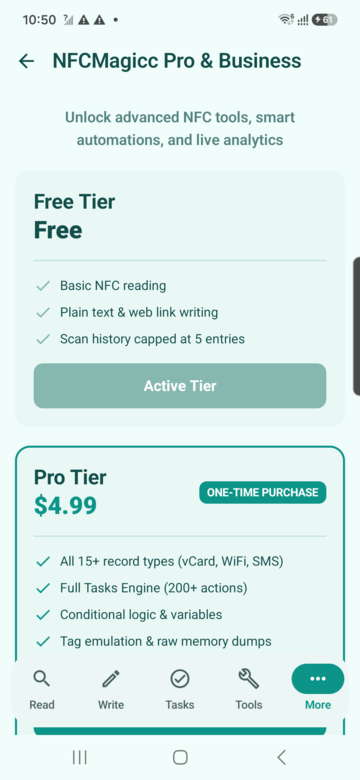
NFCMagic Pro
One paid plan, $3 once, every professional workflow unlocked
User flow: Use the Upgrade screen to unlock every professional workflow with a single $3 one-time purchase, no subscriptions and no separate business tier.
Practical scenario: A power user hits the free Batch Write or QR generation limit and upgrades once to unlock every advanced workflow, with no separate business tier to compare.
Examples
- A maker stays on Free for personal tag reading, writing and single-tag automation.
- A professional installer upgrades once for Batch Write Mode and unlimited QR generation.
- A brand or agency upgrades for Dynamic Smart Tags, AI Tap Studio, automation connectors and analytics, all included in the same Pro purchase.
Where it helps
- Installers
- Agencies
- Brands
- Enterprise pilots
App capability
Developer settings
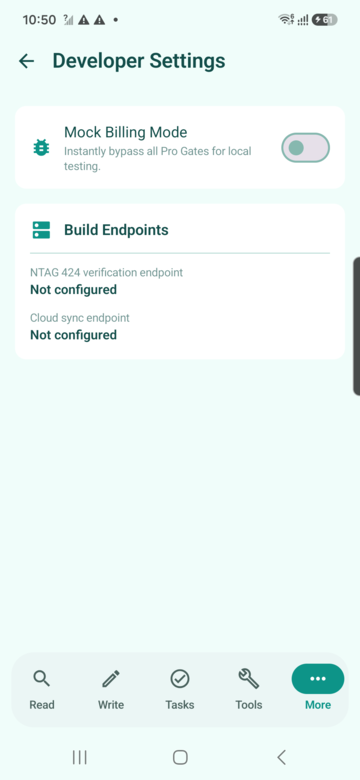
Mock billing and backend endpoint configuration
User flow: Configure local test endpoints and entitlement simulation only in development or internal testing.
Practical scenario: A developer tests entitlement gates and backend endpoints locally before moving the Firebase and hosting configuration to production.
Examples
- A developer points the app to a staging backend before production.
- QA tests gated screens without touching live billing.
- A release manager checks endpoint settings before publishing a build.
Where it helps
- Software teams
- QA
- Firebase deployments
- Release management
Tasks and automation
Real scenarios for tap-triggered workflows
Tasks are not just shortcuts. They are small physical controls placed where the action makes sense: beside a bed, near a machine, on a desk, inside a hotel room or on a product display.
Home and smart-home examples
Bedtime: the user taps a bedside NFC tag. NFCMagic can run permitted phone actions and trigger a Home Assistant or webhook scene that turns off lights, lowers heating, arms the alarm, closes smart blinds and starts a quiet-night routine. Modern Android may restrict direct Wi-Fi and silent-mode changes, so reliable smart-home control should be handled through the automation platform where needed.
Morning: the same or a second tag can run the opposite routine: lights on, heating returns to daytime, weather or calendar opens, and the family receives a status message if the task is configured to share one.
Guest mode: a tag near the door can open Wi-Fi details, send a welcome page, turn on hallway lights and open house instructions without asking the guest to install anything.
Industry and workplace examples
Maintenance: a machine tag can open the asset sheet, start an inspection timer, send a webhook to a work-order system and create a completion record.
Warehouse: a shelf tag can move an item through receive, inspect, pick and dispatch steps while keeping the user interface simple.
Healthcare rounds: authorised staff can use tags as physical prompts for checklists, time stamps and internal app links, without exposing protected card data.
Build from the Tasks page
Open the Tasks area in NFCMagic, choose actions, save the profile, then write or bind that profile to a tag. The user should only see the write button as active when the task has enough valid information to run.
See Task automation screenFirst tap, second tap
Tag Cycles turn one physical tag into a sequence
This is the feature for a single tag that changes behaviour after each successful tap. It is ideal when a location has a natural sequence.
Smart-home cycle
Tap 1
Night mode: lights off, heating lowered, alarm armed, phone quiet actions where permitted.
Tap 2
Morning mode: lights on, heating normal, weather/calendar opened, status message prepared.
Tap 3
Away mode: lock-check page, security scene, energy-saving settings through the home platform.
Loop
The cycle returns to the first task, or stops if the profile is configured as a fixed checklist.
Industrial cycle
Tap 1
Check in: identify station, open job sheet, record start event.
Tap 2
Inspection: open checklist, start timer, show safety notes.
Tap 3
Complete: submit webhook, share status text, open next work order.
Audit
Analytics and history help the team see which cycle steps were used and where operators needed support.
Friction-free Auto-run
Trusted physical taps with fewer screens between intent and action
Auto-run is for known, intentional contexts. The user turns it on, sees that NFCMagic is active, and taps a trusted tag to run a prepared task route instead of manually opening the workflow every time.
What Auto-run is for
Auto-run is not magic background cloning and it is not a way around Android permissions. It is a controlled mode for reducing repetitive steps after the user has already built a task, trusted the tag and understood what the tap should do.
The app keeps the user informed through a foreground service state, visible notification and clear on/off controls. Where Android can route compatible NFC intents directly to NFCMagic, the experience becomes faster. Where Android requires a confirmation or permission, the app should explain that honestly instead of pretending it can bypass the operating system.
Safety controls
Ask-first: useful when the action opens a URL, shares text, sends a message draft or controls a home system. The user sees what will happen before it runs.
Trusted tag allowlist: useful when a bedside, car, desk or machine tag is used daily. The app should treat unknown tags as detected, not as automatic commands.
Stop path: Auto-run must be easy to stop from the app or notification because the physical context can change. A user may enter a workshop for setup, then leave and no longer want taps to execute tasks.
Scenario: night and morning routine
At night, the user taps the bedside tag. NFCMagic runs a saved task or the first step of a Tag Cycle: call a Home Assistant webhook for lights and heating, open tomorrow's calendar, vibrate once and show a completion message. In the morning, the next tap runs the second cycle step: lights on, normal heating, weather opened and a prepared status share if configured.
Scenario: car and field work
A driver places a tag near the dashboard. The trusted tap can open navigation, prepare a "leaving now" message, start a work timer or call a smart-home away webhook. For field service, a tag on a toolbox can open the job sheet and start the inspection checklist without the technician searching through menus.
Scenario: industrial station
At a workstation, Auto-run can reduce repeated navigation. The station tag opens the current job page, starts the correct timer and sends a webhook to the team's system. A supervisor can keep ask-first enabled for destructive or audit-heavy actions, while simple open/check actions can run faster after trust is established.
Best practice
Use Auto-run for trusted daily tags, not random public tags. Pair it with Tag Cycles when the same physical tag should do something different on the first, second and third tap.
Read Auto-run scenariosAI Tap Studio
Turn plain-language ideas into editable NFC task drafts
AI Tap Studio helps users design useful tap workflows without memorising every action type. The AI drafts; the user reviews; NFCMagic validates before saving into the existing Tasks engine.
Build mode
The user can describe a goal such as "When I get in the car, open maps home, prepare a message and start a timer." AI Tap Studio converts that request into a structured task draft using supported action types. The draft is not written to a tag automatically; the user checks fields, edits text and saves only when the task is understandable.
Explain mode
When a tag contains public NDEF text, a URL or a structured payload, the user can ask for a plain-English explanation. This is useful for technicians, support teams and small businesses that need to understand what a tag appears to do before using it. Protected cards, passports and payment cards remain outside this feature's authorised content boundary.
URL safety mode
AI Tap Studio can help assess visible URLs alongside local safety checks. It should flag suspicious domains, confusing redirects, unusual characters and links that do not match the user's expectation. A suspicious result should not be auto-opened just because it came from an NFC tap.
Suggest mode
A user can ask for ideas: "What should a restaurant table NFC tag do?" Good suggestions include menu, allergen page, order status, feedback form, loyalty signup, Wi-Fi information and staff-call workflow. For factories, suggestions may include maintenance checklist, machine manual, incident report and asset history.
Scenario: smart home
The user writes: "I want one tag beside my bed. First tap at night should prepare sleep mode. Second tap in the morning should reverse it." AI Tap Studio can suggest a Tag Cycle with two task profiles: night webhook plus quiet phone actions where permitted, then morning webhook plus calendar/weather actions.
Scenario: professional installer
An installer preparing a hotel room tag asks for a guest-friendly workflow. AI Tap Studio suggests Wi-Fi, room service, checkout, house rules, maintenance request and emergency contact. The installer selects only the actions that match hotel policy, then saves the final profile.
AI Tap Studio is opt-in. Users should not send secrets, private UIDs, protected-card data or customer-sensitive content to an AI prompt.
Human-reviewed automation
The right mental model is draft, review, save. AI helps explain and compose, but the app keeps validation and user confirmation in the foreground.
Explore AI Tap StudioDynamic Smart Tags
One printed NFC or QR link, many future destinations
Dynamic Smart Tags connect the Android app, Firestore, Hosting, Cloud Functions and Android App Links so a physical tag can stay in place while its behaviour changes later.
URL mode
URL mode is for public destinations. A stable link such as https://trustqr.co.uk/t/table-12 can redirect to today's menu, tomorrow's booking page, a product manual, a warranty form or a seasonal campaign. The owner edits the target in the manager instead of rewriting the NFC tag or reprinting the QR code.
Task mode
Task mode is for installed-app experiences. Android App Links open NFCMagic when available, fetch the smart tag document, then run or prepare the associated Tasks engine profile. The app can cache the latest task so a field operator is not blocked by a weak connection after the workflow has been loaded.
QR and NFC together
The same stable link can be written to an NFC tag and rendered as a QR code. NFC gives a fast tap for modern phones; QR gives a visible camera fallback for users without NFC or for printed instructions where scanning is expected.
Scenario: restaurant and hospitality
A table tag and QR code point to a stable smart link. Breakfast hours resolve to the breakfast menu, lunch resolves to the lunch menu, dinner resolves to the dinner menu, and a special event can temporarily point to booking or allergy information. Staff do not replace labels every time the menu changes.
Scenario: retail packaging
A product package launches with a campaign video. After purchase, the same printed NFC and QR experience can move to warranty registration, support instructions, reorder links or authenticity information. This extends the usefulness of packaging beyond the first marketing moment.
Scenario: industrial maintenance
A machine tag can point to the latest checklist or run an installed-app task for authorised staff. If the maintenance system changes, the smart tag profile changes in Firestore while the tag remains physically attached to the machine.
Scenario: museums, schools and smart homes
A museum exhibit can rotate between adult guide, child-friendly explanation, accessibility audio and seasonal content. A school tag can change from lesson resources to homework instructions. A smart-home guest tag can change from Wi-Fi details to house manual, temporary event page or rental instructions.
NFCMagic uses modern App Links and hosting/backend redirect logic for dynamic tags. It does not use Firebase Dynamic Links.
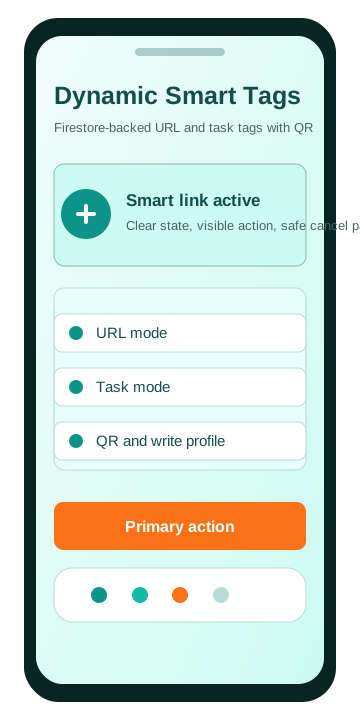
Owner-managed destination
Open the Dynamic Smart Tags area, create a profile, choose URL or task mode, generate QR, and write the stable link to a compatible tag.
Open Smart Tag Manager guideQR science and builder
Why QR codes matter, how they work, and where to create them in NFCMagic
QR is the camera-readable partner to NFC. NFC is fast and tactile; QR is universal, printable and works on phones without NFC hardware.
Philosophy and history
QR means Quick Response. It was created by Denso Wave in 1994 for high-speed tracking of automotive parts, then became a general bridge between physical surfaces and digital content. Its philosophy is simple: make a printed mark that can survive imperfect lighting, angle, dirt and partial damage while still carrying useful data.
For products, posters, tools and packaging, QR is valuable because it is cheap to print, does not require a chip, and can be scanned with a normal camera. NFC adds a premium tap experience, while QR provides fallback and visual discoverability.
Technical algorithm
A QR encoder analyses the input, chooses an efficient mode such as numeric, alphanumeric, byte or kanji, selects the smallest suitable version from 1 to 40, applies an error-correction level from L, M, Q or H, then generates Reed-Solomon correction codewords. It places finder patterns, timing patterns, alignment patterns, format data and the encoded modules into a square matrix.
The encoder tests mask patterns to reduce hard-to-scan visual artefacts, chooses the best mask score, and outputs the final black-and-white module grid. This is why a QR code can still scan after small scratches or printing defects: part of the symbol stores correction data, not only the original message.
How to build QR in NFCMagic
Open More workflows, choose QR scanner and generator, then use the Generate area to create a QR code from text, a URL, a support link, a smart tag destination or copied NFC content. Use the Scan area when you want to inspect an existing QR before using it.
Create QR from this app page
In the app, go to More, open QR Scanner and Generator, enter the content, generate the QR, then pair it with the matching NFC tag for users who prefer camera scanning.
See QR screenSafety boundary
NFCMagic does not clone protected access cards, payment cards, passports, transit cards or systems that rely on secret keys. The app can copy public NDEF payloads between compatible writable tags, and it clearly separates that from protected credential systems.
Product authenticity
NFCMagic supports planning and app-side flows for NTAG 424 DNA SUN/CMAC verification. A production deployment requires secure key handling, correctly provisioned tags and backend verification.
Dynamic tags
Dynamic tag experiences should use Android App Links, hosting and backend redirect logic. NFCMagic does not depend on Firebase Dynamic Links.
App screenshots
Every major app screen and new workflow preview
Device captures are used where available. New M8 workflows also include app-style visual previews so the website explains the complete product surface without using unrelated images.
Read tags
Tag type, UID, NDEF records, capacity, write access
Scenario: A field technician taps an unknown label, confirms it is writable, checks capacity, and reads the public NDEF content before deciding whether it can be reused.
Write composer
Create NDEF payloads and save reusable profiles
Scenario: A product team prepares a URL, Wi-Fi credential or contact payload once, saves it as a profile, then writes it to a small batch of compatible tags.
Task automation
Build tap-triggered workflows with conditions
Scenario: A workshop user creates a tag that opens a job sheet, starts a timer, shares status text and only runs when the right network or time condition is met.
NFC tools
Copy NDEF, format, erase, protect and make read-only
Scenario: An installer reads a source NDEF tag, confirms the source payload is valid, then writes that public payload to a clean target tag with visible result feedback.
More workflows
History, HCE, QR, dumps, authenticity, cycles and analytics
Scenario: A power user opens advanced workflows from one menu instead of hunting through hidden settings.
Scan history
Search, inspect and clear previous tag reads
Scenario: A support engineer searches previous scans by UID, tag type or NDEF text and opens a past result without rescanning the physical tag.
Tag emulation (HCE)
Emulate selected NDEF profiles within Android HCE limits
Scenario: A developer selects a saved profile and tests an NDEF Type 4 style sharing flow against a reader while respecting Android UID limitations.
QR scanner and generator
Scan QR codes and generate QR content from text
Scenario: A product label can carry both NFC and QR so users without NFC still reach the same destination.
Batch write mode
Write one selected payload profile to many tags
Scenario: An operations team selects a saved payload, starts batch mode, then taps multiple blank tags and reviews success and failure counts.
Memory dumps
Read, import, edit, export and write supported memory dumps
Scenario: A lab user reads bytes from a compatible tag, exports a BIN or Flipper-style file, and inspects the hex view for diagnostics.
Product authenticity
Verify secure product tags with NTAG 424 DNA style flows
Scenario: A customer or inspector taps a secure product label and receives a clear genuine, counterfeit, pending or tamper result.
NTAG 424 DNA provisioning
Configure secure URL mirrors and AES keys for supported tags
Scenario: A trusted operator prepares a secure tag template with dynamic mirror placeholders and writes configuration to a real NTAG 424 DNA tag.
Digital business card
Create and write contact details to NFC business cards
Scenario: A consultant enters contact details once, saves them, then writes the card to an NFC tag or shares directly from the phone.
Automation connectors
Webhook, Home Assistant and MQTT-style automation setup
Scenario: A smart-space installer links a tag UID to a webhook or MQTT topic so a tap can trigger a room, asset or service workflow.
Tag cycles
One tag moves through multiple task profiles
Scenario: A single desk tag cycles through check-in, start focus mode and check-out actions, advancing one step per physical tap.
Friction-free Auto-run
Trusted taps can run task profiles with fewer manual steps
Scenario: A user enables Auto-run for a trusted bedside, car or workshop tag so NFCMagic can detect the tap, show honest status, and run the selected task route with ask-first safety controls.
AI Tap Studio
Use chat-style prompts to draft, explain and check tap workflows
Scenario: A user describes a routine in plain English, reviews the AI-generated task draft, edits any action fields, then saves the final profile into the existing Tasks engine.
Dynamic Smart Tags
Firestore-backed URL and task tags with QR and write profiles
Scenario: A restaurant, product team or installer writes one stable smart link to a tag, then changes URL mode or task mode later without replacing the physical tag.
Business analytics
View tap totals, daily trends and product distribution
Scenario: A business owner reviews scan trends and product shares to understand which tags or campaigns receive engagement.
NFCMagic Pro
One paid plan, $3 once, every professional workflow unlocked
Scenario: A power user hits the free Batch Write or QR generation limit and upgrades once to unlock every advanced workflow, with no separate business tier to compare.
Developer settings
Mock billing and backend endpoint configuration
Scenario: A developer tests entitlement gates and backend endpoints locally before moving the Firebase and hosting configuration to production.