Direct answer
Find out when Canva QR codes can be tracked, why a static Canva code can never report scans, and free ways to count scans without a Canva Business plan.
The short answer
It depends on which kind of code you made. Canva now offers static and dynamic QR codes. Canva says scan tracking, such as scan counts, device data and location data, is available with Canva Business or Enterprise. A static code made in Canva cannot report scans, on any plan, because of how static codes work.
- Static Canva code
- The web address is written directly into the pattern. The phone opens that address itself, so nothing in between can count the scan.
- Dynamic Canva code
- The code points to a short Canva-managed link that forwards to your page. That forwarding step is where a scan can be counted, if your plan includes tracking.
Why a static QR code can never be tracked
A QR code is only a picture of some text. When the text is your full web address, a scanning phone reads it and goes straight to your site. No service sits between the scan and the visit, so there is nothing that could count it. This is true for static codes from Canva, Adobe Express, Word or any other design tool.
- What you can still measure
- If you own the destination website, you can count visits that came from the code by adding campaign parameters to the link before you generate it.
- What you cannot recover
- Codes that are already printed without campaign parameters cannot be changed. Any tracking has to be added to new prints.
Free option 1: add UTM parameters to the link
Before you create the code in Canva, add campaign parameters to the web address, for example ?utm_source=flyer&utm_medium=qr&utm_campaign=spring-sale. Google Analytics then groups visits that arrived through that link under the campaign name, so you can compare flyers, posters or menus.
- Best for
- Your own website, where Google Analytics or another analytics tool is already installed.
- Limits
- It counts visits to your site, not scans. It does not work when the code points to someone else's site, a social profile, Wi-Fi details or a PDF on a file host.
Free option 2: use a trackable QR code as the link inside your design
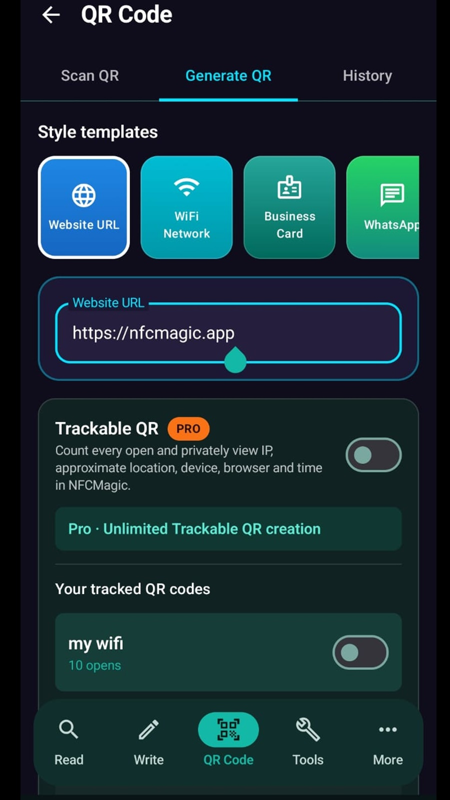
Create a trackable QR code in a separate app, then place that code, or its short link, in your Canva design. Canva is only the design tool; the tracking happens in the app that owns the link. In NFCMagic for Android, you create a Trackable QR code, and each open records the date and time, approximate IP-based location, device, browser, operating system and language in a private report that only you can see.
- Destination freedom
- It works for any destination, including pages you do not own, because the count happens before the visitor is forwarded.
- Cost
- NFCMagic lets every user create one trackable QR code for free. More trackable codes need NFCMagic Pro.
How to put a trackable code into a Canva design
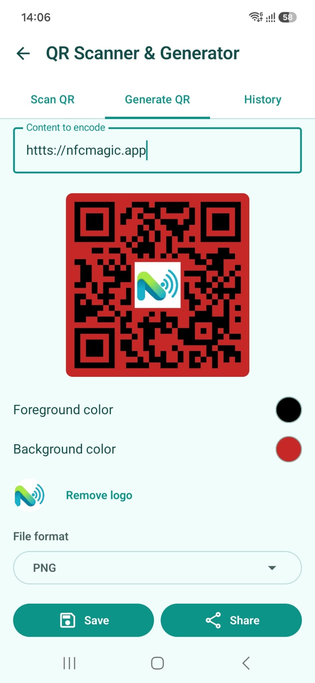
Generate the trackable code in NFCMagic, export it as SVG or high-resolution PNG, then upload it to Canva as an image. Keep the white margin around the code, do not stretch it, and test the finished print with two or three phones before a large run.
- Contrast
- Keep dark modules on a light background. Light-on-dark and low-contrast brand colors fail on some phone cameras.
- Size
- About 2 cm per side works for scanning at arm's length. Posters read from a distance need a much larger code.
Which option should you choose?
If you already pay for Canva Business and need codes only in Canva, its dynamic codes are the simplest route. If you are on a free plan, start with UTM parameters for your own site. Use a separate trackable QR code when you need scan counts for a destination you do not own, or want to see where and on which devices your code is scanned.
- Privacy
- Tell people when a code is tracked, especially on printed material, and collect only what you need. Some locations treat IP addresses as personal data.
- Consistency
- Use one tracking method per campaign so the numbers stay comparable between flyers and posters.
How to tell whether your Canva code is static or dynamic
Scan the code with your phone and look at the link it shows before opening. If it shows your own full web address, the code is static and cannot be tracked. If it shows a short link that forwards to your page, it is dynamic. In Canva, dynamic codes are the ones created with the Create dynamic option.
- Quick test
- Most phone cameras show a link preview before opening. Compare that preview with your final address.
- Why it matters
- Only a dynamic or trackable code can be counted or edited after printing.
Setting up UTM parameters step by step
Start with your normal page address, then add ?utm_source= for where the code is printed, &utm_medium=qr, and &utm_campaign= for the campaign name. Use short, lowercase words without spaces, and give each flyer or poster its own utm_source so you can compare them.
- Example
- https://example.com/offer?utm_source=window-poster&utm_medium=qr&utm_campaign=autumn-sale
- Check it works
- Scan the finished code yourself and look for the visit in your analytics real-time report before printing.
What to do with QR codes that are already printed
A printed static code cannot be switched to tracking. If it points to a page on your own site that is used only on that print, the visits to that page are a good estimate of scans. Otherwise, add a sticker with a new trackable code on the next print run, or replace the material when it is reprinted.
- Dedicated page
- A page address used only on one flyer turns its normal visit count into a scan estimate.
- Next print run
- Plan tracking before printing; it is the only point where the code's link can be chosen freely.
Common mistakes that break tracked codes in designs
Most scanning problems come from design changes after the code is created. Stretching the image, placing text or shapes over it, removing the white margin or recoloring it with low contrast can all stop phones from reading it.
- Keep proportions
- Resize the code only from a corner so it stays square.
- Do not edit the link afterwards
- Changing the link in another tool after exporting creates a different code; export again instead.
Quick reference
| Method | Counts | Main limit |
|---|---|---|
| Static Canva QR code | Nothing | Cannot be tracked after printing |
| Canva dynamic QR code | Scans, device, location | Tracking needs Canva Business or Enterprise |
| UTM parameters | Visits to your own site | Only works for sites you own and track |
| Trackable QR code app | Every scan, time, device, approximate location | One free code in NFCMagic; more need Pro |
Related NFCMagic app screens
These screenshots connect this track QR code scans in Canva guide to the related Android workflow in NFCMagic. They show the matching screens in the NFCMagic Android app.
Frequently asked questions
Does Canva track QR code scans?
Canva says it can track scan counts, device data and location data for dynamic QR codes on Canva Business or Enterprise. Static Canva QR codes are not tracked.
Can I make an existing Canva QR code trackable?
Not a printed static code, because its destination is fixed in the pattern. You need to print a new code that points to a trackable or campaign-tagged link.
Can I track QR code scans for free?
Yes. Add UTM parameters for your own website, or use a trackable QR code app. NFCMagic includes one free trackable QR code.
Do QR code scans show who scanned the code?
No. A tracked scan shows time, device type and approximate location, not the person's name or phone number.
Primary technical sources
- Canva: Free QR code generator — Canva's own description of static versus dynamic QR codes, editable destinations, expiry and scan tracking on Business or Enterprise plans.
- Google Analytics Help: URL builders and campaign data — How utm_source, utm_medium and utm_campaign parameters attribute visits to a campaign in Google Analytics.
- GDPR Recital 30: Online identifiers — Explains that IP addresses and similar online identifiers can be used to profile and identify people.
- DENSO WAVE: Determining QR code area — Official module sizing and four-module quiet-zone guidance for print production.