Direct answer
Learn which QR codes can be tracked, exactly what data a tracked scan collects, what it can never reveal about the person scanning, and how to track scans responsibly.
Only QR codes with a managed link can be tracked
A QR code itself is passive printed data. It cannot send anything anywhere. Tracking is possible only when the code points to a link run by a tracking service, which records the visit and then forwards the phone to the real destination. A static code that contains your final web address cannot be tracked by anyone.
- Tracked
- Dynamic or trackable codes whose link passes through a service that counts each open before redirecting.
- Not tracked
- Static codes with the final address, Wi-Fi details, contact cards or plain text written directly into the pattern.
What a tracked scan can record
When a phone opens a trackable link, the service sees the same basic information any website sees on a normal visit. NFCMagic records the date and time, the public IP address with an approximate location derived from it, and the device, browser, operating system and language, and shows them only to the code owner.
- Approximate location
- IP-based location usually points to a city or region, sometimes only the mobile network's area. It is not a street address.
- Precise location
- A website can get precise GPS location only if the person taps Allow on the browser's location request. Nobody can read it silently from a scan.
What a scan can never reveal
A scan does not reveal the person's name, phone number, email address, contacts or photos. The phone camera reads the code; the only thing sent is an ordinary web request when the link opens. If the person never opens the link, nothing reaches the tracking service at all.
- No identity by default
- Scan analytics describe devices and places, not people, unless the landing page itself asks the visitor to sign in or fill in a form.
- Repeat scans
- The same phone scanning twice usually appears as two opens. Counts are opens, not unique people.
Common uses for QR code tracking
Tracking answers practical questions: which flyer, poster, product label or business card actually gets scanned, at what times, and in which cities. Comparing two codes on two versions of a poster is one of the cheapest ways to test print marketing.
- One code per placement
- Create a separate trackable code for each location or print run, so the report shows which one works.
- Edit after printing
- Dynamic codes let you change the destination later without reprinting, for example to fix a broken link or swap an offer.
Tracking responsibly
IP addresses and other online identifiers can be personal data in some places, including under the GDPR. Collect only what you need, keep the reports private, say near the code when it is tracked where that is expected, and never ask the browser for precise location unless the visitor clearly benefits from it.
- Transparency
- A short note such as 'Scans are counted to measure this campaign' builds trust on printed material.
- Owner-only reports
- NFCMagic keeps Trackable QR analytics visible only to the code owner and does not sell them.
How to make a trackable QR code on Android
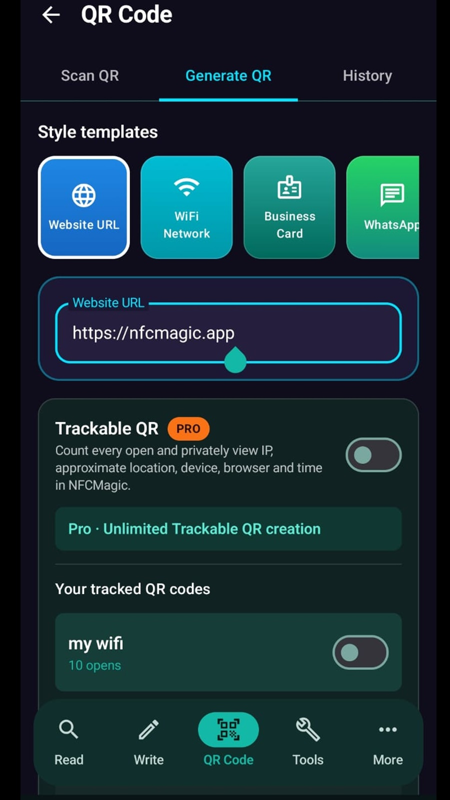
Open NFCMagic, go to QR Code, choose Generate QR, enter the destination and turn on Trackable QR. Save or share the code, then open Your tracked QR codes to see the number of opens and the details of each scan. Every user can create one trackable code for free; NFCMagic Pro adds more.
- Test before printing
- Scan the finished code yourself and confirm the open appears in the report before a large print run.
- Keep it scannable
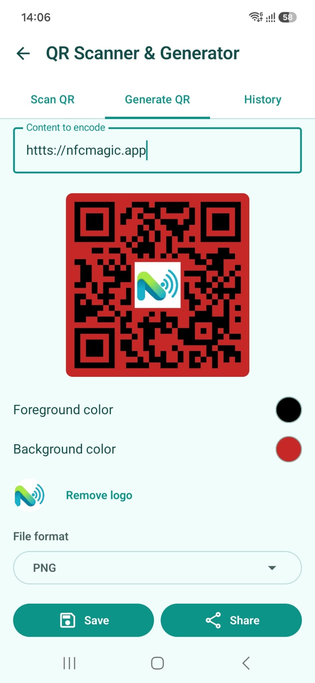
- Use strong contrast, keep the white margin and avoid printing the code too small.
Static, dynamic and trackable codes in one minute
A static code contains the final content itself and never changes. A dynamic code contains a short link whose destination the owner can change later. A trackable code is a dynamic code whose link also records each open. Every trackable code is dynamic, but not every dynamic code is tracked.
- Static
- Fixed content, no counts, works forever without any service.
- Trackable
- Editable destination plus a private scan report, but depends on the link service staying online.
How accurate is QR scan location?
Location from an IP address is an estimate. It is often right at the country and city level, but mobile networks, VPNs and company networks can place a scan in a different city or at the network's hub. Treat it as a trend across many scans, not as proof of where one person was.
- Good for
- Comparing which cities or regions scan a campaign most.
- Not good for
- Finding a specific person, building or street.
How to check a QR code before you scan it
Fake QR codes stuck over real ones are a known scam. Before opening a link, read the address your camera shows. Be careful with short links on parking meters, payment signs and emails, and never enter passwords or card details on a page you reached from an unexpected code.
- Look for stickers
- A code printed on a sticker over another code is a warning sign.
- Use a scanner that previews
- NFCMagic's scanner shows the decoded content before you choose to open it.
Reading a scan report correctly
Counts are opens, not unique people. The same phone can open a code several times, and messaging apps or link-preview services can sometimes open a shared link automatically. Compare codes with each other over the same period rather than reading a single number on its own.
- Look at patterns
- Time of day and day of week often show where and when a poster is actually seen.
- Compare fairly
- Use one code per placement and compare them over the same dates.
Quick reference
| Question | Answer |
|---|---|
| Can a static QR code be tracked? | No |
| Does a tracked scan show time and device? | Yes |
| Does it show an exact address? | No, only an approximate IP-based area unless the visitor allows GPS |
| Does it show the person's name or number? | No |
Related NFCMagic app screens
These screenshots connect this are QR codes trackable guide to the related Android workflow in NFCMagic. They show the matching screens in the NFCMagic Android app.
Frequently asked questions
Can someone track me if I scan a QR code?
Only if the code uses a tracking link and you open it. The owner then sees the time, device type and approximate area, not your name or number.
Can a QR code get my exact location?
Not by itself. A website can get precise location only if you allow the browser's location request.
How can I tell if a QR code is trackable?
Look at the link before opening it. A short link or a tracking-service domain usually means scans are counted; a direct address to the final site usually means they are not.
Are QR code scan counts exact?
They count opens. The same person scanning twice is counted twice, and scans where the link was never opened are not counted.
Primary technical sources
- GDPR Recital 30: Online identifiers — Explains that IP addresses and similar online identifiers can be used to profile and identify people.
- MDN: Geolocation API — Browsers only share precise device location after the user grants permission.
- Google Analytics Help: URL builders and campaign data — How utm_source, utm_medium and utm_campaign parameters attribute visits to a campaign in Google Analytics.
- Canva: Free QR code generator — Canva's own description of static versus dynamic QR codes, editable destinations, expiry and scan tracking on Business or Enterprise plans.