Direct answer
Explore QR Code history, ISO standards, module anatomy, data encoding, Reed-Solomon correction, camera decoding, industrial uses and NFCMagic QR workflows.
Why industry needed something beyond a linear barcode
By the early 1990s, Japanese factories were scanning growing numbers of one-dimensional barcodes on parts and production documents. Linear symbols were proven and inexpensive, but their modest capacity, one-axis reading geometry and need for several labels created friction in fast automotive workflows that had to track more data with fewer scans.
- Two-dimensional opportunity
- Encoding across rows and columns can place substantially more information into the same label area than a line of bars whose capacity grows mainly with width.
- Operational requirement
- The design target was not visual novelty; it was rapid, dependable identification while parts moved through manufacturing, logistics and electronic Kanban processes.
Masahiro Hara, DENSO and the 1994 release
A DENSO development team led by Masahiro Hara created the symbol that DENSO WAVE released in 1994. The name expressed the Quick Response design goal: a reader should locate and decode the mark rapidly even when its orientation differed from the scanner's expected direction.
- Position detection
- Three large corner patterns gave the reader a distinctive geometric signature for finding the code, establishing orientation and correcting perspective.
- Adoption strategy
- DENSO WAVE made the standardised specification available for broad use and waived enforcement of its relevant patent rights for compliant QR Codes, helping the format spread beyond one vendor.
From factory floors to public mobile use
Automotive production adopted QR Code first for part management, shipping and transaction documents. DENSO WAVE records 2002 as the point when public use expanded rapidly in Japan because mobile phones with built-in QR-reading features let consumers reach websites, coupons, tickets and contact information by aiming a phone camera at the mark.
- Important distinction
- Those early camera phones combined optics, image processing and QR software; the camera sensor alone did not understand the symbol.
- Consumer bridge
- Once a general-purpose phone could decode the mark, QR changed from an industrial identifier into a low-cost connection between printed objects and digital services.
The standardisation timeline
QR Code moved through industry, Japanese and international specifications rather than becoming a de facto format with no formal definition. AIM International approved it in 1997, JEIDA followed in 1998, JIS X 0510 arrived in 1999 and ISO/IEC 18004 made it an international standard in June 2000.
- Current edition
- ISO/IEC 18004:2024 is Edition 4 and covers symbol characteristics, data encoding, dimensions, error correction, reference decoding, production quality and user parameters.
- Separate quality layer
- ISO/IEC 15415:2024 defines measurement and grading methods for two-dimensional symbol quality, complementing the symbology rules in ISO/IEC 18004.
When did ordinary cameras start supporting QR Code?
There is no single year when cameras became QR-compliant because QR recognition is software layered on camera hardware. Phones with dedicated reader features drove Japanese mass adoption from 2002; later smartphone camera apps and operating-system services made recognition routine, but Android support still varies by manufacturer, camera app and installed services.
- Current iPhone model
- Apple's Camera app and Code Scanner automatically detect a QR symbol and present the decoded action on supported current devices.
- Current Android model
- Android developers can integrate ML Kit for a custom on-device camera workflow or use Google Code Scanner through Play services; neither means every historic Android camera app gained support on one universal date.
Versions, modules and the geometry formula
A QR symbol is a square grid of light and dark modules. Model 2 provides Versions 1 through 40: Version 1 is 21 by 21 modules, and each version adds four modules on every side until Version 40 reaches 177 by 177 modules.
- Dimension formula
- For Model 2, side modules equal 21 + 4 × (version − 1); Version 7 is therefore 45 modules per side before its quiet zone.
- Physical size
- A symbol's millimetre size depends on module pitch, version and the required clear border, not on a universal QR width such as two centimetres.
The functional patterns inside the square
Not every dark square stores user data. Finder patterns, separators, timing patterns, alignment patterns, format information, version information and a fixed dark module give the decoder geometry and configuration before it interprets the interleaved payload and correction codewords.
- Three finders
- The large patterns at the upper-left, upper-right and lower-left corners establish location and orientation; surrounding separators help isolate them from neighbouring data.
- Alignment growth
- Larger versions add alignment patterns so the sampled grid can be corrected for lens perspective, print stretch and surface distortion.
What the timing, format and version fields do
Alternating timing modules define the row and column rhythm used to sample the matrix. Format information encodes the selected error-correction level and mask reference with its own protection, while Version 7 and above also carry explicit version information in reserved areas.
- Sampling grid
- Once the finder geometry is known, timing and alignment structures help the decoder map camera pixels back to discrete module centres.
- Early configuration
- The reader needs correction level and mask identity before recovering the data region, so these fields are decoded ahead of the application payload.
Data modes and character-count fields
An encoder chooses one or more modes, writes a mode indicator, a version-dependent character-count field and the encoded values. Numeric mode packs digits efficiently, alphanumeric mode uses a defined 45-character set, byte mode carries octets and Kanji mode compacts supported Shift JIS values; ECI and FNC1 add interpretation context.
- Segmentation benefit
- A strong encoder can divide mixed content into efficient segments instead of forcing an entire mostly numeric payload into byte mode.
- Reader compatibility
- A technically valid specialised mode can still fail in a particular library; Google documents ECI-mode QR as a limitation of its current ML Kit barcode recognition.
Capacity is a matrix of version, mode and correction
The familiar maximum figures—7,089 numeric characters, 4,296 alphanumeric characters, 2,953 bytes or 1,817 Kanji characters—describe favourable Version 40 conditions rather than every QR Code. More correction, mixed modes and long byte payloads reduce practical capacity and create denser symbols.
- Density cost
- At a fixed printed width, selecting a larger version makes each module physically smaller and increases demands on focus, print gain and camera pixel detail.
- Operational rule
- Encode a short stable identifier or HTTPS URL when possible; do not treat theoretical maximum capacity as a content target.
How the encoder creates data codewords
After segment indicators and values, the encoder adds a terminator when space permits, pads to a complete byte boundary and inserts alternating pad codewords until the version-and-level data capacity is filled. The resulting bytes are divided into the block structure defined for that symbol configuration.
- Deterministic rules
- Two correct encoders may produce different-looking symbols for identical visible text because segmentation, character encoding, version choice and mask selection can differ.
- Application layer
- The QR standard preserves bytes and certain interpretation metadata; deciding that those bytes represent a URL, Wi-Fi profile or payment object belongs to a higher protocol.
Reed-Solomon error correction in practical terms
QR uses Reed-Solomon error-correction codewords so a decoder can reconstruct bounded damage. The four selectable levels are commonly described as approximately 7 percent for L, 15 percent for M, 25 percent for Q and 30 percent for H, but those figures refer to codeword recovery rather than a guaranteed percentage of any arbitrary image area.
- Trade-off
- Raising correction adds redundancy, which can increase the required version or reduce the data that fits in a chosen version.
- Damage pattern
- A compact obstruction can destroy a different distribution of codewords than scattered dirt, so equal visible damaged area does not imply equal recoverability.
Why codeword blocks are interleaved
Data and correction bytes are arranged into blocks and interleaved before placement. Interleaving distributes consecutive bytes across the matrix, helping a local scratch or stain affect pieces of several correction blocks instead of erasing one long uninterrupted run of a single block.
- Decoder sequence
- After unmasking and reading the placement path, the decoder deinterleaves codewords into their original blocks before applying Reed-Solomon correction.
- No magic repair
- If corruption exceeds the correction capability of one or more blocks, the symbol can remain undecodable even when much of it appears visually intact.
Data placement and the eight mask patterns
The encoder places the interleaved bitstream through the available modules in the defined zig-zag path while avoiding reserved function areas. It evaluates eight mask formulas that invert selected data modules, scores the candidates for undesirable visual structures and records the selected mask in the format information.
- Purpose of masking
- Masking breaks up long runs, large same-color regions and patterns that could confuse finder detection or make optical sampling less reliable.
- Same payload, new appearance
- Different valid version, segmentation or mask choices explain why two QR generators can encode identical content into non-identical module patterns.
The complete QR encoding pipeline
A production encoder analyses the input, selects segments, chooses an error level, finds the smallest usable version, emits mode and length fields, creates data codewords, computes correction blocks, interleaves them, places bits, evaluates masks and finally renders modules with an adequate quiet zone.
- Validation point
- Decode the generated result with an independent library and compare the recovered bytes or normalized semantic value before approving a batch.
- Rendering point
- Keep module edges aligned to the output grid; antialiased resizing and non-integer raster scaling can blur boundaries that were mathematically valid.
How a camera actually decodes a QR Code
The camera supplies frames, not decoded links. Software converts or analyses image luminance, locates finder candidates, estimates a perspective transform, samples module centres, validates format and version data, removes the mask, extracts codewords, corrects them and parses the recovered mode segments.
- Perspective transform
- The visible quadrilateral can be projected back toward a square grid so a code photographed at an angle is sampled in logical module coordinates.
- Action after decode
- Only after error correction does the application classify bytes as text, URL, contact, Wi-Fi or another type and decide whether to display, copy, share or open them.
Focus, exposure, pixels and motion
A detector needs enough pixels across the smallest module, stable focus, usable contrast and limited motion blur. Google advises that meaningful barcode elements generally occupy at least two pixels in each dimension and recommends practical camera resolutions rather than maximum sensor resolution when latency matters.
- Frame processing
- Real-time Android scanners should avoid accumulating stale frames; close each CameraX ImageProxy after processing and keep only the latest frame under load.
- Distance
- Moving closer enlarges modules until focus fails; moving farther improves focus but eventually leaves too few pixels, so the usable window depends on optics and symbol density.
Quiet zone, contrast and physical sizing
A standard Model 2 QR Code requires a clear quiet zone four modules wide on every side. Total side length therefore equals the symbol modules plus eight quiet-zone modules, multiplied by the chosen physical module size; text, borders, logos and background artwork must remain outside this reserved field.
- Worked example
- A Version 7 symbol has 45 data-area modules; with its border it occupies 53 modules, so a 0.50 mm module produces a 26.5 mm total square.
- Contrast direction
- Dark modules on a light uniform background remain the most interoperable choice because reflective scanners and many thresholding pipelines assume that polarity.
Print quality is more than a successful phone scan
A single successful scan does not grade a production symbol. ISO/IEC 15415 defines measurement and overall grading methods for two-dimensional matrix codes, while ISO/IEC 16480 addresses codes shown on electronic displays or read by general-purpose cameras under ambient lighting.
- Measured attributes
- Professional verification considers optical and geometric characteristics such as contrast, modulation, fixed-pattern damage, axial nonuniformity and grid nonuniformity.
- Production proof
- Verify final substrates, ink, lamination, curvature and print process rather than approving only the source SVG on a bright monitor.
Logos, colors and branded QR design
A centered logo deliberately covers modules and consumes correction margin. Use a high correction level, keep the obstruction bounded, protect finder and alignment patterns, preserve strong luminance contrast and test the exact exported and printed artifact across multiple decoder implementations.
- Error correction is not decoration budget
- Level H improves recovery but cannot guarantee success for an oversized logo, transparent overlay, gradient or cropped quiet zone.
- Brand hierarchy
- Place visual branding outside the code whenever possible and let the symbol remain a simple high-contrast machine-readable component.
Static codes, dynamic destinations and resolvers
Every printed QR pattern is physically static, but a short HTTPS identifier can resolve to content that an authorised owner updates later. A dynamic system therefore depends on durable domain ownership, safe redirects, access control, caching, monitoring and a retirement page—not on a special kind of changing ink.
- Canonical identity
- Keep the physical URL stable and change server-managed destination data so packaging, signs and paired NFC tags do not require replacement.
- Open redirect risk
- Validate allowed destinations and protect owner updates; an unrestricted redirect endpoint turns a trusted printed domain into phishing infrastructure.
Manufacturing, logistics and maintenance applications
QR remains useful for work orders, part identity, electronic Kanban, inventory, maintenance checkpoints, return processing and instructions. The correct payload may be an internal identifier rather than a public URL, with a controlled application mapping that identifier to permissions and current operational data.
- Traceability
- An identifier becomes useful when backend events define which item, lot, location and process step it represents; the black-and-white symbol is only the carrier.
- Harsh environments
- Direct part marks and industrial labels need appropriate quality methods, illumination tests and damage analysis rather than consumer-camera assumptions.
Payment QR Codes require a payment protocol
A generic camera can decode a payment symbol's bytes without understanding how to authorise a transaction. EMVCo maintains separate consumer-presented and merchant-presented QR specifications that define interoperable payment data structures, while payment providers handle the messages, authentication, risk and settlement after scanning.
- Consumer-presented mode
- The customer displays a code and the merchant's optical scanner or device reads it as part of the payment flow.
- Merchant-presented mode
- The merchant displays the code and a compatible wallet or payment application parses it; an ordinary camera URL reader may not process the domain-specific payload.
GS1 Digital Link and the product web
GS1 Digital Link expresses identifiers such as GTIN, GLN and SSCC in a structured web URI. Encoded in QR or another permitted carrier, that identity can support point-of-sale and supply-chain lookup while a resolver connects consumers or business applications to product information, instructions, traceability and services.
- One physical entry point
- A brand owner can update linked digital content without altering the on-pack identifier, while authorised systems continue using the underlying GS1 keys.
- Authenticity limit
- A Digital Link printed in ordinary QR can still be copied; stronger product proof needs instance state, signatures, secure tags or another verification control.
Security threats: replacement, quishing and unsafe actions
QR Code has no built-in trust indicator for the meaning of its payload. An attacker can cover a legitimate sign, print a lookalike code, encode a deceptive domain or redirect through a compromised service, so applications and physical deployments must treat every decoded value as untrusted input.
- Safe interaction
- Display the normalized destination and effective host before navigation, reject dangerous schemes and require confirmation for payments, credentials, downloads or account actions.
- Physical control
- Use placement inspection, tamper-evident materials and a recognisable controlled domain where replacement would create meaningful risk.
Accessibility, privacy and human instructions
A QR symbol alone is not an accessible instruction. Pair it with readable purpose text, strong contrast, reachable placement and a short alternative route; do not encode personal data, passwords or stable tracking identifiers that any nearby camera can recover without authentication.
- Equivalent access
- Make the linked page keyboard- and screen-reader-friendly, and provide staff or manual alternatives when a user cannot operate the camera flow.
- Data minimisation
- Measure aggregate resolutions and task outcomes when possible instead of building a permanent person-level history from every physical scan.
How NFCMagic scans QR Codes on Android
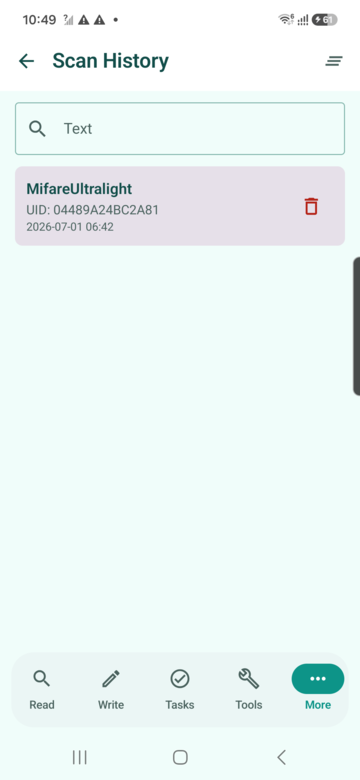
NFCMagic provides a custom CameraX scanning screen and sends correctly rotated image frames to Google ML Kit. Processing occurs asynchronously, the frame is closed after completion and the detected raw value is shown for deliberate copy or share while scanned items can be reviewed in local history.
- Permission boundary
- The custom live preview requests camera permission only for the scan workflow; QR generation and saved-history review do not require the camera.
- Honest result
- NFCMagic displays the recovered content instead of claiming that a successful optical decode proves the destination, product or payment is genuine.
How NFCMagic generates and exports QR Codes
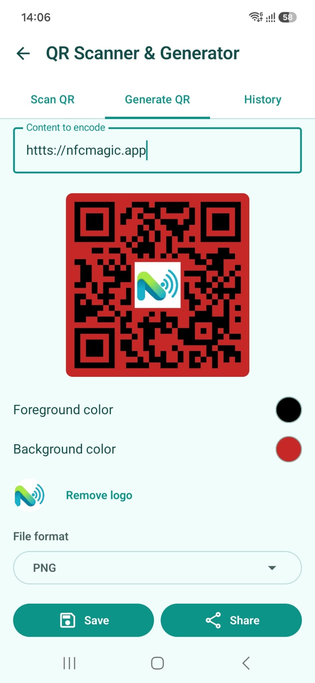
The NFCMagic generator uses ZXing to encode QR, chooses error-correction Level M for ordinary output and Level H when a center logo is added, then renders a live preview with configurable foreground and background colors. Users can save PNG, JPEG, WEBP or scalable SVG and share a PNG copy.
- Logo behavior
- The app adds a background-colored pad behind a center logo and limits the logo to one quarter of the rendered width, but final scan testing remains required.
- Production margin
- When placing an NFCMagic export into print artwork, ensure the final composition retains a total clear quiet zone of at least four modules on all sides.
NFCMagic history and dynamic-tag workflows
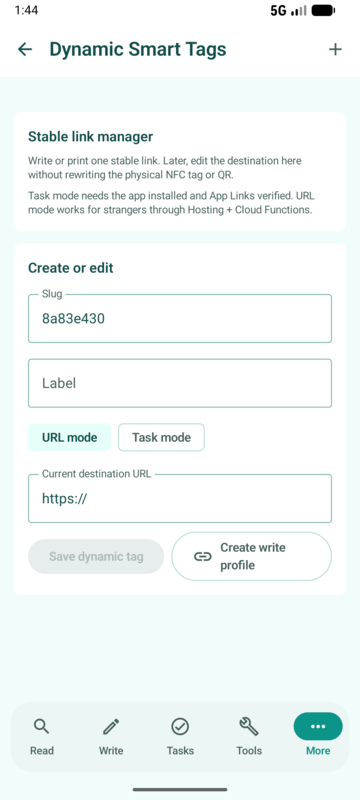
Separate Created codes and Scanned codes lists make it possible to revisit or delete local QR work. Dynamic Smart Tags can represent the same stable owner-managed URL as both a QR image and an NFC payload, providing a camera fallback without maintaining two unrelated destinations.
- Lifecycle benefit
- One resolver allows authorised content updates after deployment and keeps support instructions consistent across tap and scan entry points.
- Privacy boundary
- History should remain user-controlled, with clear deletion and no need to upload raw scan values merely to display or search them locally.
A professional QR deployment checklist
Define the payload contract, owner and lifetime; choose version and correction from measured data; render with integer-aligned modules and a four-module border; verify source and final production; test several cameras; protect redirects; document replacement; and monitor the destination for the full physical lifespan.
- Acceptance evidence
- Record decoded payload, symbol dimensions, substrate, printer, quality grade when required, device matrix, lighting range and observed failure modes.
- Retirement
- Keep a useful successor or explanation at the stable URL instead of allowing deployed products and signs to decay into unexplained 404 responses.
What QR Code will continue to do well
QR endures because it is standardised, visually reproducible, inexpensive to print and decodable by general-purpose imaging devices. Its future value is strongest when the physical symbol stays simple while secure protocols, resolvers and accessible applications provide the changing behavior behind it.
- Coexistence
- QR, Data Matrix, NFC and emerging digital identity methods solve different physical and protocol problems; mature products combine them where evidence supports the added complexity.
- Engineering priority
- Better destinations, safer actions, measured print quality and honest user guidance usually create more value than decorative changes to the module pattern.
QR Code history and standards timeline
| Year | Milestone | Why it matters |
|---|---|---|
| 1994 | DENSO WAVE releases QR Code | Fast automotive identification begins |
| 1997 | AIM International approval | Industry symbology recognition |
| 1998 | JEIDA-55 approval | Japanese electronics standardisation |
| 1999 | JIS X 0510 approval | Japanese national standard |
| 2000 | ISO/IEC 18004 approval | International QR specification |
| 2002 | QR-reading phones spread in Japan | Public camera-based use accelerates |
| 2015 | ISO/IEC 18004 Edition 3 | Updated international specification |
| 2022 | ISO/IEC 23941 for rMQR | Rectangular Micro QR standardised |
| 2024 | ISO/IEC 18004 Edition 4 | Current QR symbology standard |
Core Model 2 technical dimensions
| Property | Specification | Design consequence |
|---|---|---|
| Versions | 1 through 40 | Capacity and density increase by version |
| Data-area side | 21 to 177 modules | Four modules added per version step |
| Side formula | 21 + 4 × (version − 1) | Compute geometry before physical sizing |
| Quiet zone | Four modules per side | Add eight modules to total width and height |
| Correction | L, M, Q or H | More redundancy reduces available payload |
| Maximum symbols in structured append | 16 | Large logical data can be divided when readers support it |
Maximum published Model 2 capacities
| Mode | Maximum characters | Practical caution |
|---|---|---|
| Numeric | 7,089 | Requires favourable Version 40 conditions |
| Alphanumeric | 4,296 | Uses the defined 45-character set |
| Byte | 2,953 bytes | Text character count depends on encoding |
| Kanji | 1,817 | Specific compact representation and reader support |
Error-correction levels
| Level | Approximate codeword restoration | Typical decision |
|---|---|---|
| L | 7% | Clean environments and maximum capacity |
| M | 15% | Common general-purpose baseline |
| Q | 25% | Greater dirt or damage exposure |
| H | 30% | Highest redundancy or a carefully tested logo |
Camera-support eras without a false universal date
| Era | Typical reader | Meaning |
|---|---|---|
| 1990s | Industrial 2D imagers | Dedicated manufacturing and logistics scanning |
| From 2002 in Japan | Feature phones with QR readers | Public web, coupon and ticket use expands |
| Smartphone app era | Downloaded scanner applications | Software adds support independent of default camera |
| Current platforms | Native camera UI, ML Kit or Code Scanner | Support depends on OS, vendor, service and application |
Quick reference
| Deployment question | Recommended answer | Avoid |
|---|---|---|
| What should be encoded? | Short stable HTTPS identity or defined application payload | Long disposable campaign URLs |
| How should it be rendered? | Dark modules, light background, integer grid and four-module border | Blurred resizing, gradients and cropping |
| How should it be tested? | Independent decode plus final physical verification | Approving only an on-screen preview |
| How should it be trusted? | Validate domain, protocol, authorization and backend state | Treating successful scanning as authenticity |
Related NFCMagic app screens
These screenshots connect this QR Code history and technology guide to the related Android workflow in NFCMagic. They document interface states; radio behavior still requires a physical Android device and real tags.
Frequently asked questions
Who invented QR Code and when?
A DENSO development team led by Masahiro Hara created it, and DENSO WAVE released QR Code in 1994 for fast industrial identification.
When did phone cameras begin supporting QR Code?
There is no universal camera-standard date. QR-reading feature phones drove Japanese public adoption from 2002; later smartphone support arrived through apps, vendor camera software and platform services.
What is the current international QR standard?
ISO/IEC 18004:2024 is the current Edition 4 QR code bar code symbology specification.
How many modules are in a QR Code?
Model 2 ranges from 21 × 21 modules at Version 1 to 177 × 177 at Version 40, adding four modules per side for every version.
Does Level H mean 30 percent of the picture can be covered?
No. The percentage is an approximate codeword restoration figure, and recoverability depends on block structure, placement and damage pattern.
Why do two generators make different QR patterns for the same text?
They may choose different modes, segment boundaries, versions or masks while still encoding the same recovered data correctly.
Can an ordinary QR Code prove a product is genuine?
No. A normal symbol can be copied. Authenticity requires secure instance evidence, signed data, controlled state or another verification architecture.
What QR features does NFCMagic provide?
NFCMagic scans with a CameraX and ML Kit workflow, generates ZXing QR output with colors and optional logo, exports PNG, JPEG, WEBP or SVG, and maintains user-controlled local history.
Primary technical sources
- DENSO WAVE: History of QR Code — Primary account of the 1994 release, automotive origins and the spread of QR-reading mobile phones in Japan from 2002.
- DENSO WAVE: QR Code standardisation — Timeline covering AIM, JEIDA, JIS and ISO adoption plus the published QR capacity and error-correction outline.
- ISO/IEC 18004:2024 QR code symbology specification — Current international specification for symbol characteristics, encoding, dimensions, error correction, decoding and quality requirements.
- DENSO WAVE: QR Code versions and capacity — Official Version 1-40 geometry and the relationship between data, correction level and module count.
- DENSO WAVE: QR error correction — Primary explanation of Reed-Solomon codewords and Levels L, M, Q and H.
- DENSO WAVE: Determining the QR Code area — Official instructions for module sizing and the four-module quiet zone.
- DENSO WAVE: Types of QR Code — Official comparison of Model 1, Model 2, Micro QR, rMQR, SQRC and FrameQR.
- ISO/IEC 15415:2024 2D barcode print quality — Current measurement and grading framework for two-dimensional matrix symbol quality.
- ISO/IEC 16480:2015 mobile-device reading and display — Quality assessment for codes on electronic displays and symbols intended for general-purpose cameras in ambient light.
- ISO/IEC 23941:2022 rMQR specification — International specification for rectangular Micro QR Code encoding, dimensions, correction and quality.
- Google ML Kit: Barcode scanning on Android — Current Android guidance for camera frames, supported formats, structured results and real-time scanning performance.
- Google Code Scanner for Android — Official permissionless scanning flow implemented through Google Play services for applications without a custom camera UI.
- Apple Support: Scan a QR code with iPhone Camera — Current native iPhone Camera and Code Scanner behavior for detected QR content.
- GS1 Digital Link — Global standard for expressing identifiers such as GTIN, GLN and SSCC in web-compatible links and resolver services.
- EMVCo: EMV QR Codes — Official consumer-presented and merchant-presented payment QR specifications and processing boundaries.